Complete Guide to Editing PDF Files Without Installing Software
PDF documents are widely used for contracts, reports, invoices, forms, and official records. However, editing a PDF file has traditionally required specialized software that needs to be installed on your computer. For many users, installing additional programs can be inconvenient or unnecessary, especially when they only need to make quick changes.
Today, modern online tools make it possible to edit PDF online without software directly from a web browser. These tools allow users to modify text, add annotations, insert images, and update documents without downloading or installing any applications.
Online editors provide a quick and convenient way to work with PDFs from any device. Whether you need to update a report, fill out a form, or make corrections to a document, you can use a free PDF editor online to complete the task within minutes.
In this guide, we will explore how to modify PDF in a browser, the benefits of using online editing tools, and how platforms like PDFTechno provide an easy way to manage and edit PDF documents efficiently.
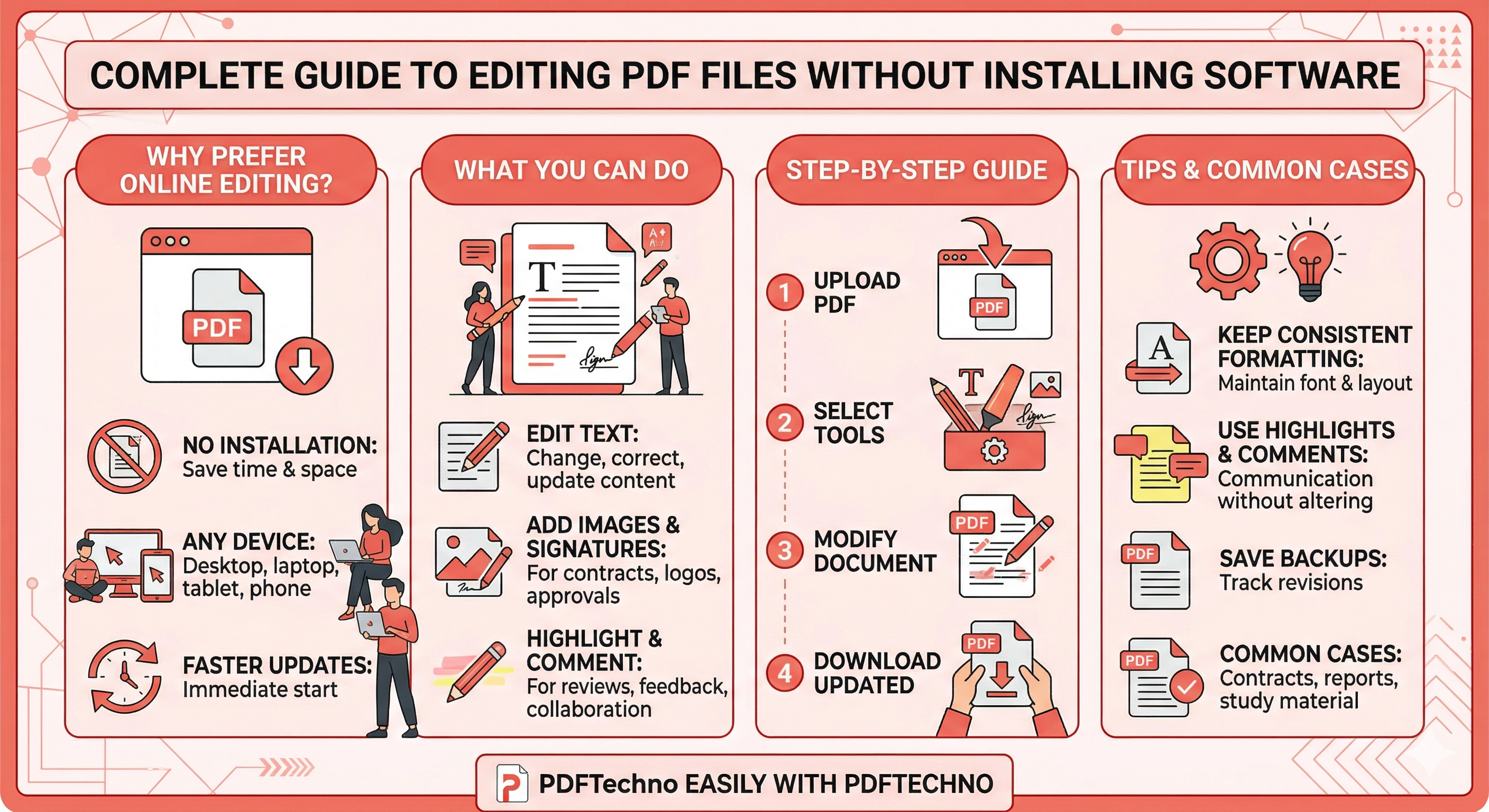
Why People Prefer Editing PDFs Online
Online PDF editors have become increasingly popular because they simplify the document editing process. Instead of installing software or dealing with complex programs, users can access editing tools directly through their web browser.
This approach saves time and provides a more flexible way to manage documents.
No Software Installation Required
One of the main advantages of using an online editor is that it eliminates the need to install additional software. Traditional PDF editors often require downloads, updates, and storage space on your device.
With online tools, users can simply upload their file and start editing immediately. This makes it easy to edit PDF online without software and complete tasks quickly.
This approach is especially helpful for users who only need occasional PDF editing and do not want to install full editing software.
Access from Any Device
Online PDF editors can be accessed from virtually any device that has an internet connection and a web browser.
Whether you are using a desktop computer, laptop, tablet, or smartphone, you can upload your document and begin editing instantly. This flexibility allows users to modify PDF in a browser without being restricted to a single device.
Being able to edit documents from anywhere makes online tools ideal for remote work and collaboration.
Faster Document Editing
Traditional software can take time to install and configure before you are able to begin editing a document. Online tools remove this barrier by providing immediate access to editing features.
Once the file is uploaded, users can start making changes right away using the available tools. This makes a PDF editing tool in the browser a faster solution for handling document updates.
For quick modifications or urgent edits, online editors provide a convenient and efficient option.
What You Can Do with an Online PDF Editor
Online PDF editors provide a wide range of features that allow users to modify documents easily. These tools are designed to handle many common editing tasks without requiring advanced technical knowledge.
Using a free PDF editor online, users can update content, add annotations, and customize documents directly in their browser.
Edit Text in PDFs
One of the most common tasks when working with PDFs is editing text. Online tools allow users to change existing text, correct spelling errors, or update information within a document.
Instead of recreating the entire file, you can simply open the document in a PDF editing tool and make the necessary adjustments.
This feature is especially useful for updating reports, invoices, and official documents.
Add Images or Signatures
Many online editors also allow users to insert images or add digital signatures to a PDF. This can be helpful when signing contracts, adding company logos, or attaching supporting visuals.
Being able to modify PDF in a browser makes it easier to complete these tasks quickly without printing or scanning documents.
Digital signatures also simplify document approvals and help streamline workflows.
Highlight, Annotate, and Comment
Another useful feature of online PDF editors is the ability to highlight text, add comments, or annotate documents.
These tools are commonly used when reviewing reports, providing feedback on documents, or collaborating with colleagues.
Annotations make it easier to communicate ideas directly within the document while keeping the original content intact.
Using a free PDF editor online, users can review and update documents more efficiently without needing additional software.
Step-by-Step Guide to Edit PDF Online Without Software
Editing a PDF directly in your browser is a straightforward process when you use an online editing tool. Instead of installing programs or converting the document into another format, you can upload the file and begin editing immediately.
By following a few simple steps, you can edit PDF online without software and make changes quickly using a browser-based editor.
Step 1: Upload the PDF File
The first step is to upload the PDF document you want to edit. This could be a contract, report, form, or any document that requires updates.
Once the file is uploaded to the editor, the system loads the document and prepares it for editing. The pages of the PDF become visible so you can begin making modifications.
Uploading the document allows you to start using the free PDF editor online directly from your browser.
Step 2: Select Editing Tools
After the document is uploaded, you can choose from a range of editing tools provided by the platform.
Most online editors include options such as text editing, highlighting, adding comments, inserting images, and placing signatures. These tools allow users to customize the document based on their needs.
Using the available tools, you can easily begin working with the PDF editing tool to modify your document.
Step 3: Modify the Document
Once the editing tools are selected, you can start making changes to the document. This may include updating text, adding annotations, highlighting sections, or inserting additional content.
Online editors are designed to make these tasks simple so that users can modify PDF in a browser without complicated steps.
This stage allows you to adjust the document until it reflects the required changes.
Step 4: Download the Updated PDF
After finishing the edits, the final step is to save and download the updated document.
The editor processes the changes and generates a new version of the PDF file. Once the file is ready, you can download it to your device and share it as needed.
By following these steps, users can easily edit PDF free tool features online and update documents without installing software.
Edit PDFs Easily with PDFTechno
While many online tools offer PDF editing features, choosing a reliable platform ensures that your documents remain well formatted and easy to manage.
PDF Techno provides a convenient way to edit PDF online without software using a browser-based interface designed for simplicity and efficiency.
Why Use an Online PDF Editor
Online PDF editors allow users to access editing tools instantly without downloading additional programs. This makes document editing faster and more accessible.
Instead of installing complex software, users can upload their documents and start working with them immediately.
Using a browser-based solution allows users to modify PDF in a browser and complete editing tasks from virtually any device.
Edit PDF Files in Seconds
With PDF Techno, users can upload a PDF file and begin editing it within seconds. The platform offers tools that help users update text, add annotations, and manage documents quickly.
Using PDFTechno, you can:
- Edit PDF online without software
- Use a free PDF editor online from your browser
- Modify PDF in a browser quickly
- Access a reliable PDF editing tool for document updates
This makes PDF Techno a practical solution for professionals, students, and businesses that need a fast way to edit PDF documents.
Tips for Editing PDFs Efficiently Online
Editing PDFs online is convenient, but following a few best practices can help ensure that the document remains clear, well formatted, and easy to manage. Using the right approach can make the editing process faster and more efficient.
These tips can help you get the most out of a PDF editing tool while working directly in your browser.
Keep Formatting Consistent
When making changes to a document, it is important to maintain consistent formatting. This includes font styles, text alignment, spacing, and overall layout.
If new text or elements are added with different formatting, the document may appear unprofessional or difficult to read. Before finalizing your edits, review the document to ensure everything looks consistent.
Maintaining proper formatting helps users edit PDF online without software while keeping the document visually organized.
Use Highlighting and Comments
Highlighting and commenting tools are useful for reviewing documents and sharing feedback with others. Instead of altering the original text, users can add notes or highlight important sections.
This approach is particularly helpful for teams reviewing reports, contracts, or project documents.
Using these features in a free PDF editor online allows users to communicate suggestions and ideas directly within the document.
Save Backup Copies
Before making major edits to a PDF, it is a good practice to keep a backup copy of the original file. This ensures that the original version remains available if changes need to be reversed.
Saving backup versions also helps track different revisions of the document over time.
By keeping a copy of the original file, users can safely modify PDF in a browser without worrying about losing important information.
Common Use Cases for Online PDF Editing
Online PDF editing tools are used in many professional, educational, and personal scenarios. These tools make it easier to update documents quickly without installing additional software.
Below are some common situations where users need to edit PDF online without software using browser-based tools.
Editing Contracts and Forms
Contracts, agreements, and forms often need to be updated with new information or corrections. Instead of printing and rewriting these documents, users can open them in an online editor and make changes instantly.
Using a PDF editing tool makes it easier to fill in forms, add signatures, or update important details.
Updating Reports and Documents
Business reports and project documents may require regular updates. When changes need to be made quickly, using an online editor allows users to edit the document without converting it to another format.
With a free PDF editor online, users can correct errors, update figures, or add comments directly to the document.
Annotating Study Material
Students and educators frequently use PDFs for textbooks, research papers, and lecture notes. Annotation tools allow users to highlight key information and add comments for future reference.
By using an online editor, students can modify PDF in a browser and organize their study material more effectively.
Conclusion
Editing PDF documents no longer requires installing heavy software or complex editing programs. With modern browser-based tools, users can quickly update documents, add annotations, and modify content directly online.
Using an online editor makes it possible to edit PDF online without software while maintaining the original formatting of the document. This approach is especially helpful for quick updates, document reviews, and collaborative work.
Online platforms provide convenient features that allow users to modify PDF in a browser, update text, add comments, and manage documents from any device with internet access. These tools eliminate the need for downloads and allow users to begin editing immediately.
Tools like PDF Techno make the process simple by offering a reliable PDF editing tool that works directly in your browser. With the ability to upload files, make changes, and download updated documents within minutes, users can manage PDF files efficiently.
By using a free PDF editor online, individuals and businesses can streamline document editing, improve productivity, and handle PDF updates without installing additional software.
Frequently Asked Questions
How can I edit a PDF online without software?
You can upload your document to an online PDF editor and use browser-based tools to modify text, add comments, or insert images. After editing, the updated file can be downloaded.
Is there a free PDF editor online?
Yes, many platforms provide a free PDF editor online that allows users to edit documents directly through their browser.
Can I modify PDFs directly in a browser?
Yes, browser-based editors allow users to modify PDF in a browser without installing additional software.
What is the best PDF editing tool?
The best tool depends on your needs, but reliable online platforms like PDF Techno provide features for editing text, adding annotations, and managing documents efficiently.
Can I edit PDF files for free online?
Yes, several tools allow users to edit PDF free tool features online, enabling them to update documents without downloading or installing software.