Edit PDF vs Repair PDF: What's the Difference and Which One Do You Need?
Introduction
PDF files have become the standard format for sharing important documents because they preserve formatting, look professional on every device, and are easy to exchange. Whether you're working with resumes, contracts, invoices, presentations, business reports, or academic documents, PDFs help ensure your content appears exactly as intended. However, while working with PDF files, users often encounter two common tasks — editing and repairing.
Although these terms may sound similar, they solve entirely different problems. Sometimes you simply need to update text, add images, insert signatures, or rearrange pages, while other times the PDF may refuse to open, display missing content, or show corruption errors that require repairing before it can even be accessed. Knowing the difference between editing and repairing a PDF can save time, prevent data loss, and help you choose the right solution for your document. In this guide, we'll explain Edit PDF vs Repair PDF, highlight their key differences, discuss when each option should be used, and show how PDF Techno makes it easier to manage your PDF files efficiently with powerful and user-friendly PDF tools.
What Does "Edit PDF" Mean?
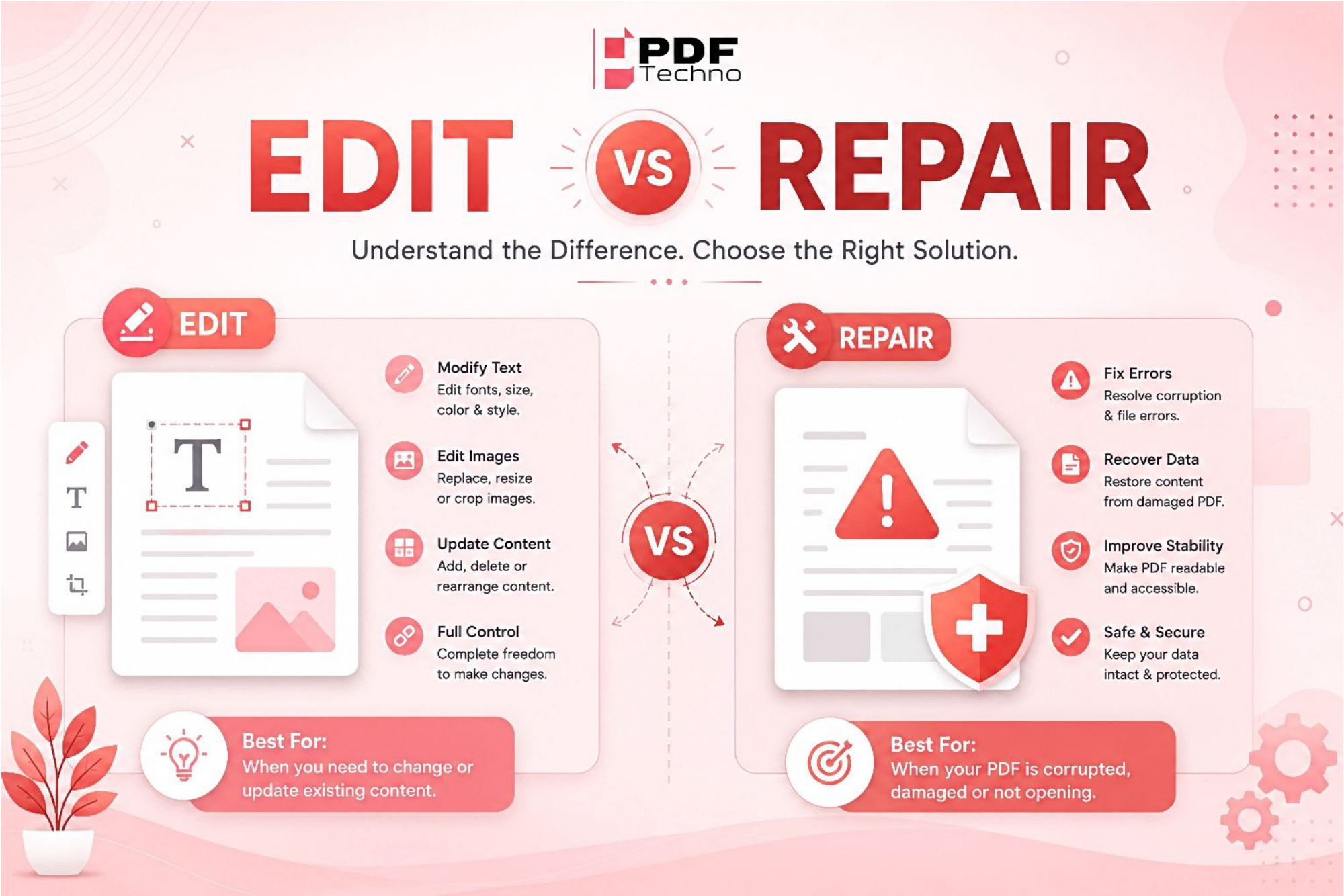
Editing a PDF means making changes to a document that is already working properly. If your PDF opens without any issues but contains outdated information, spelling mistakes, incorrect formatting, or missing content, editing is the right solution. You can modify text, replace images, add logos, insert or delete pages, highlight important sections, fill out forms, or add electronic signatures. Instead of creating a new document from scratch, editing lets you update the existing PDF while keeping its layout and formatting intact. This makes it ideal for business documents, resumes, contracts, invoices, reports, and other files that need regular updates.
What Does "Repair PDF" Mean?
Repairing a PDF is completely different from editing because its purpose is to recover a file that has become damaged or corrupted. A PDF may stop opening due to interrupted downloads, software crashes, storage errors, virus attacks, or file transfer issues. In such cases, editing isn't possible because the document itself is no longer functioning correctly. A PDF repair tool attempts to restore the file's internal structure, making it readable and accessible again without changing its original content. Once the document has been successfully repaired, you can then edit it if needed. Repairing is especially useful for important documents that cannot be opened or display errors, helping you recover valuable information instead of recreating the file from scratch.
When Should You Edit a PDF?
Choose editing if you want to:
- Update personal information
- Correct mistakes
- Add signatures
- Rearrange pages
- Insert new content
- Remove unnecessary pages
If the PDF opens without any issues, editing is usually the right solution.
When Should You Repair a PDF?
Repair is the better choice when:
- Your PDF refuses to open
- The file becomes corrupted after downloading
- Data appears missing
- The document shows unexpected errors
- The PDF was damaged during transfer or storage
Repairing focuses on recovering the file rather than changing its content.
Common Reasons PDFs Become Corrupted
A PDF may need repairing because of:
- Interrupted downloads
- Sudden power failures
- Storage device errors
- Virus or malware attacks
- Improper file transfers
- Software crashes
Keeping backup copies of important PDFs can help prevent data loss.
How PDF Techno Helps in Both Repairing and Editing PDF?
Managing PDFs doesn't have to be complicated. PDF Techno offers simple tools that make working with PDF files much easier.
With PDF Techno, you can:
- Edit PDF documents quickly
- Add or remove pages
- Organize PDF files
- Convert PDFs into different formats
- Compress PDFs for easy sharing
- Use secure document management tools for everyday work
Whether you're updating an existing document or preparing files for sharing, PDF Techno helps you complete the task efficiently.
Final Thoughts
Editing and repairing PDFs serve different purposes. If your document opens normally and only needs updates, editing is the right choice. If the file is damaged, unreadable, or corrupted, repairing should be your first step.
Understanding this difference helps you choose the correct solution and prevents unnecessary frustration. With the right PDF tools from PDF Techno, managing your documents becomes faster, easier, and more reliable.
Frequently Asked Questions (FAQs)
1. What is the difference between editing and repairing a PDF? Editing changes the content, while repairing fixes a damaged or corrupted PDF file.
2. Can I edit a corrupted PDF? Usually no. The PDF should be repaired first before editing.
3. When should I repair a PDF? When it won't open, shows errors, or has missing content.
4. Can PDF Techno help edit PDF files? Yes. PDF Techno provides tools to edit, organize, convert, and manage PDF documents easily.
5. Will repairing a PDF change its content? No. Repairing aims to restore the file so it can be opened and viewed without altering its intended content.