How Students Can Organize Study Notes Using PDF Tools
Students often receive lecture slides, research papers, assignments, and reading material in PDF format. Over time, these files can accumulate quickly, making it difficult to keep track of important study materials. Without proper organization, finding specific notes during exam preparation can become time-consuming and stressful.
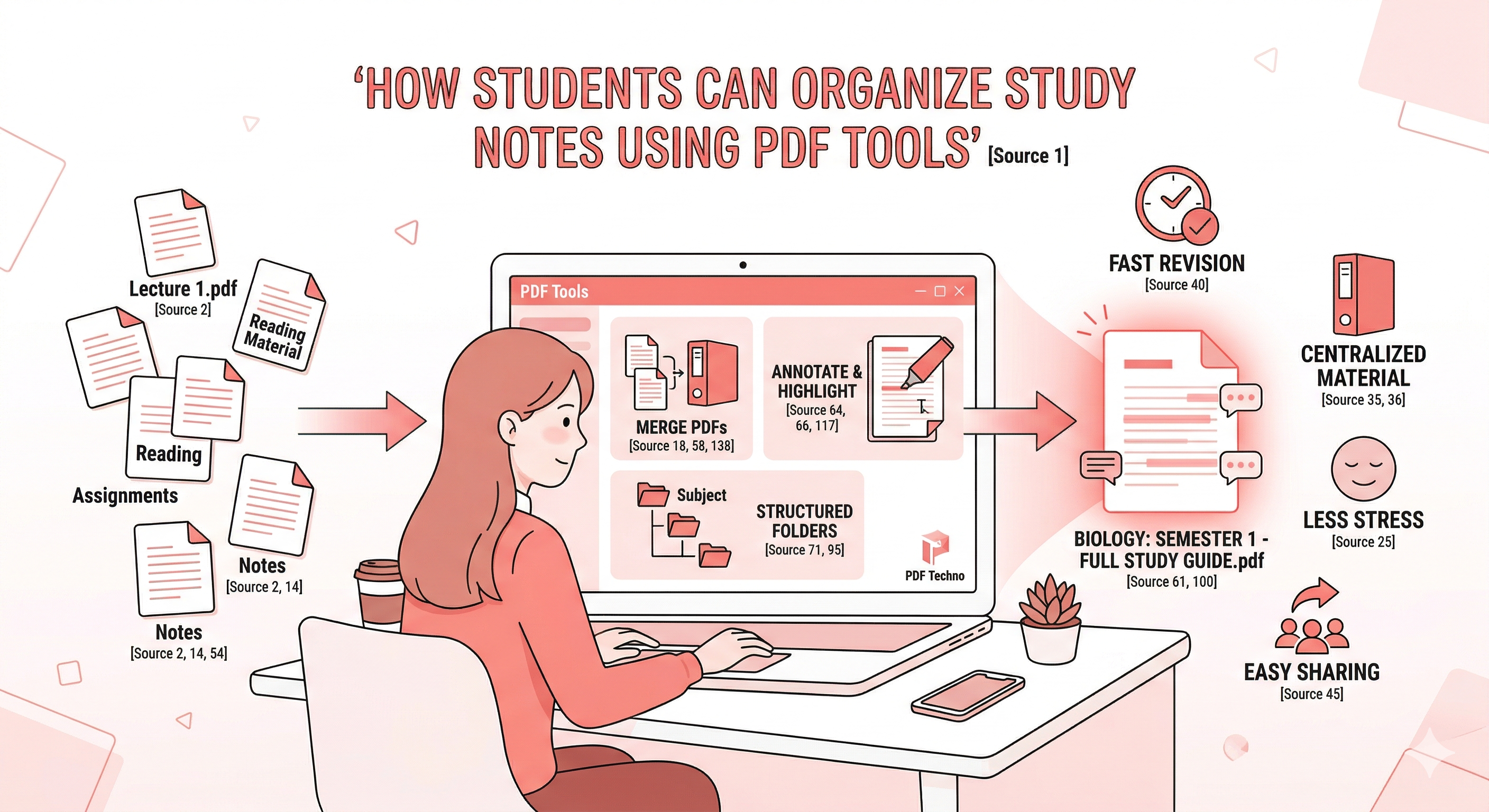
Using the right tools can help students organize study notes PDF files efficiently and manage their academic materials in a structured way. PDF tools allow students to combine lecture notes, highlight important sections, and maintain well-organized digital study resources.
Instead of keeping dozens of scattered files across devices, students can use PDF study tools to combine lecture PDFs and manage academic documents more effectively. With a well-organized digital system, it becomes easier to review notes, revise topics, and prepare for exams.
In this guide, we will explore how students can organize study notes using PDF tools, simplify student PDF management, and make studying more efficient using platforms like PDF Techno.
Why Students Struggle to Manage Study Notes
Many students rely heavily on digital documents for their coursework. While PDFs are convenient for sharing lecture materials, managing multiple files from different classes can quickly become overwhelming. Without a clear organization system, important documents may become difficult to locate when they are needed most.
Multiple Lecture PDFs from Different Classes
Students often receive lecture slides, assignments, and study materials in separate PDF files for each class. Over the course of a semester, this can result in dozens or even hundreds of documents.
Keeping these files scattered across folders can make it difficult to review them during exam preparation. Using tools to combine lecture PDFs helps consolidate related materials into a single organized document. This approach allows students to keep their study materials structured by subject or topic.
Disorganized Digital Notes
When files are stored without a clear naming or folder structure, it becomes difficult to locate important notes. Students may spend valuable study time searching for specific lectures or topics.
Organizing digital notes helps create a more efficient study environment. By learning how to organize study notes PDF files properly, students can maintain a structured system for their academic documents. A well-organized file system also helps reduce stress during busy academic periods.
Difficulty Finding Important Material
During revision periods, students often need to quickly locate key concepts or lecture notes. If documents are poorly organized, finding the right material can take longer than expected.
Using proper student PDF management techniques ensures that important documents are easy to locate. Combining and organizing study materials helps students focus on learning rather than searching for files.
Benefits of Organizing Study Notes with PDF Tools
Using PDF tools to manage academic documents offers several advantages. Instead of juggling multiple files across different locations, students can keep their study materials structured and accessible. Organizing study notes digitally helps improve productivity and makes exam preparation more efficient.
Centralized Study Material
Combining related lecture notes into a single document helps keep all relevant information in one place. Students can use tools to combine lecture PDFs by subject or topic, creating organized study files.
Having centralized materials reduces the time spent searching for documents and allows students to review topics more efficiently. This method is one of the easiest ways to organize study notes PDF files for better academic management.
Faster Revision Before Exams
When study materials are organized properly, revision becomes much easier. Students can quickly review all relevant notes without switching between multiple files.
Organized documents also allow students to highlight key concepts and add annotations for future reference. Effective student PDF management ensures that revision sessions remain focused and productive.
Easier Sharing with Classmates
Students frequently share notes, lecture slides, and study materials with classmates. Organized documents make this process much simpler.
By combining lecture notes and organizing them clearly, students can share complete study guides with others in their class. Using PDF study tools allows students to collaborate more effectively and exchange learning resources easily.
Step-by-Step Guide to Organize Study Notes Using PDF Tools
Organizing digital study material does not require complicated systems. With the help of simple PDF tools, students can structure their lecture notes, assignments, and reading material in a way that makes studying easier. Following a few steps can help students organize study notes PDF files effectively and maintain better student PDF management throughout the semester.
Step 1: Collect All Lecture PDFs
The first step is gathering all your lecture slides, reading materials, assignments, and notes in one place. Students often download PDFs from learning portals, emails, or class groups, which can quickly create scattered files across different folders.
Collecting all documents for each subject helps you manage academic documents more efficiently. Once everything is in one location, organizing the files becomes much easier. Creating a dedicated folder for each subject is a good starting point.
Step 2: Combine Lecture PDFs by Subject
After gathering all documents, the next step is to organize them by subject or topic. Students can combine lecture PDFs into a single file for each subject so that all related material is stored together.
For example, you can merge lecture slides, notes, and supplementary readings into one organized PDF. This reduces the need to open multiple files while studying. Using tools to combine lecture PDFs helps create structured study documents that are easier to review during revision.
Step 3: Highlight and Annotate Important Sections
Once the documents are organized, students can start marking important information. PDF annotation tools allow users to highlight key concepts, add comments, and mark sections that require further review.
Using PDF study tools helps students engage with the material more actively while studying. Highlighting definitions, formulas, and important explanations can make revision much faster and more effective.
Step 4: Save and Organize Files in Folders
After editing and combining the notes, it is important to maintain a clear folder structure. Students can create folders for each subject and organize documents by lecture number or topic.
Using descriptive file names also helps make documents easier to locate later. Maintaining organized folders improves student PDF management and ensures that important study materials are always easy to access.
Organize Study PDFs Easily with PDF Techno
Managing large numbers of lecture PDFs can be difficult without the right tools. Using a reliable PDF platform simplifies the process and helps students keep their study materials well organized. PDF Techno provides a convenient solution for students who want to organize study notes PDF files and manage academic documents more efficiently.
Why Students Should Use PDF Tools
PDF tools allow students to combine, edit, and organize documents without needing advanced technical skills. Instead of working with multiple scattered files, students can merge lecture notes, annotate key sections, and maintain structured study documents. Using dedicated PDF study tools helps students keep their academic resources organized throughout the semester.
Combine and Manage Lecture PDFs in Seconds
With PDF Techno, students can upload multiple lecture files and combine them into a single organized document within seconds. The platform allows students to:
- Combine lecture PDFs quickly
- Organize study notes PDF files by subject
- Manage academic documents efficiently
- Improve overall student PDF management
This makes it easier for students to prepare for exams, review lecture materials, and maintain organized digital study resources.
Best Practices for Managing Academic PDFs
Keeping study materials organized throughout the semester requires consistent habits. When students regularly manage their digital documents, it becomes much easier to review topics and prepare for exams. Following a few simple practices can help students manage academic documents efficiently and maintain well-organized digital study resources.
Create Subject-Based Files
One effective strategy is organizing notes by subject. Instead of storing all lecture PDFs in a single folder, students can create separate folders for each course.
Within each folder, lecture slides, assignments, and study materials can be stored together. This method helps students organize study notes PDF files by topic or subject, making it easier to locate materials during revision. Subject-based organization also reduces clutter and keeps academic documents structured.
Use Clear File Naming
File names play an important role in document organization. Instead of generic names such as Lecture1.pdf, students can use more descriptive titles like Biology-Lecture-1-Cell-Structure.pdf.
Clear naming conventions help students quickly identify the contents of each file. Using descriptive file names improves student PDF management and ensures that important study materials are easy to locate.
Keep Backup Copies of Important Notes
Digital documents can sometimes be lost due to accidental deletion or device issues. Keeping backup copies of important files ensures that study materials remain safe.
Students can store backup copies on cloud storage platforms or external drives. Maintaining backups helps protect valuable academic materials and supports effective PDF study tools usage for long-term study management.
Common PDF Tools Students Use for Study Management
PDF tools provide a variety of features that help students manage and interact with their study materials more effectively. These tools allow students to combine documents, annotate notes, and optimize files for sharing. Using the right PDF study tools can significantly improve how students organize and access their learning resources.
PDF Merging Tools
PDF merging tools allow students to combine multiple lecture slides and reading materials into a single document. This helps reduce the number of files students need to open while studying.
By using tools that combine lecture PDFs, students can create organized study guides that contain all related materials in one place. This approach simplifies revision and improves study efficiency.
Annotation and Highlighting Tools
Annotation tools allow students to highlight important sections, add notes, and mark key concepts within their study material.
These features help students interact with the content more actively and retain information more effectively. Using annotation features within PDF study tools helps students create personalized study notes directly inside their documents.
PDF Compression for Sharing
Students often share notes and lecture materials with classmates. Large files can sometimes be difficult to send through email or messaging platforms.
PDF compression tools reduce file size without affecting readability, making documents easier to share. Combining compression with proper student PDF management ensures that files remain easy to distribute and store.
Conclusion
Managing study materials effectively is essential for academic success. As students accumulate lecture slides, assignments, and reading materials throughout the semester, keeping these documents organized becomes increasingly important.
Using the right tools can help students organize study notes PDF files and maintain a structured system for their academic documents. By combining lecture materials, highlighting key concepts, and storing files in organized folders, students can make their study resources easier to access and review.
PDF tools simplify this process by allowing students to combine lecture PDFs, annotate important sections, and improve overall student PDF management. These features make it easier to prepare for exams, review course content, and collaborate with classmates.
Platforms like PDF Techno provide practical PDF study tools that help students manage academic documents more efficiently. With the ability to merge files, edit notes, and organize study materials in one place, students can create a well-structured digital study system.
By adopting these strategies, students can stay organized, reduce time spent searching for notes, and focus more on learning and exam preparation.
Frequently Asked Questions
How can students organize study notes using PDFs?
Students can organize study notes by combining lecture PDFs, creating subject-based folders, and using annotation tools to highlight key information.
What tools help combine lecture PDFs?
PDF merging tools allow students to combine multiple lecture files into a single organized document.
What are the best PDF study tools for students?
PDF tools that support merging, annotation, compression, and document organization are commonly used by students to manage study materials.
How can I manage academic documents digitally?
Students can manage academic documents by creating structured folders, using clear file names, and combining related PDFs into organized study files.
Can PDF tools help with student document management?
Yes, PDF tools help students combine lecture materials, annotate notes, and maintain organized digital study resources for easier revision.