
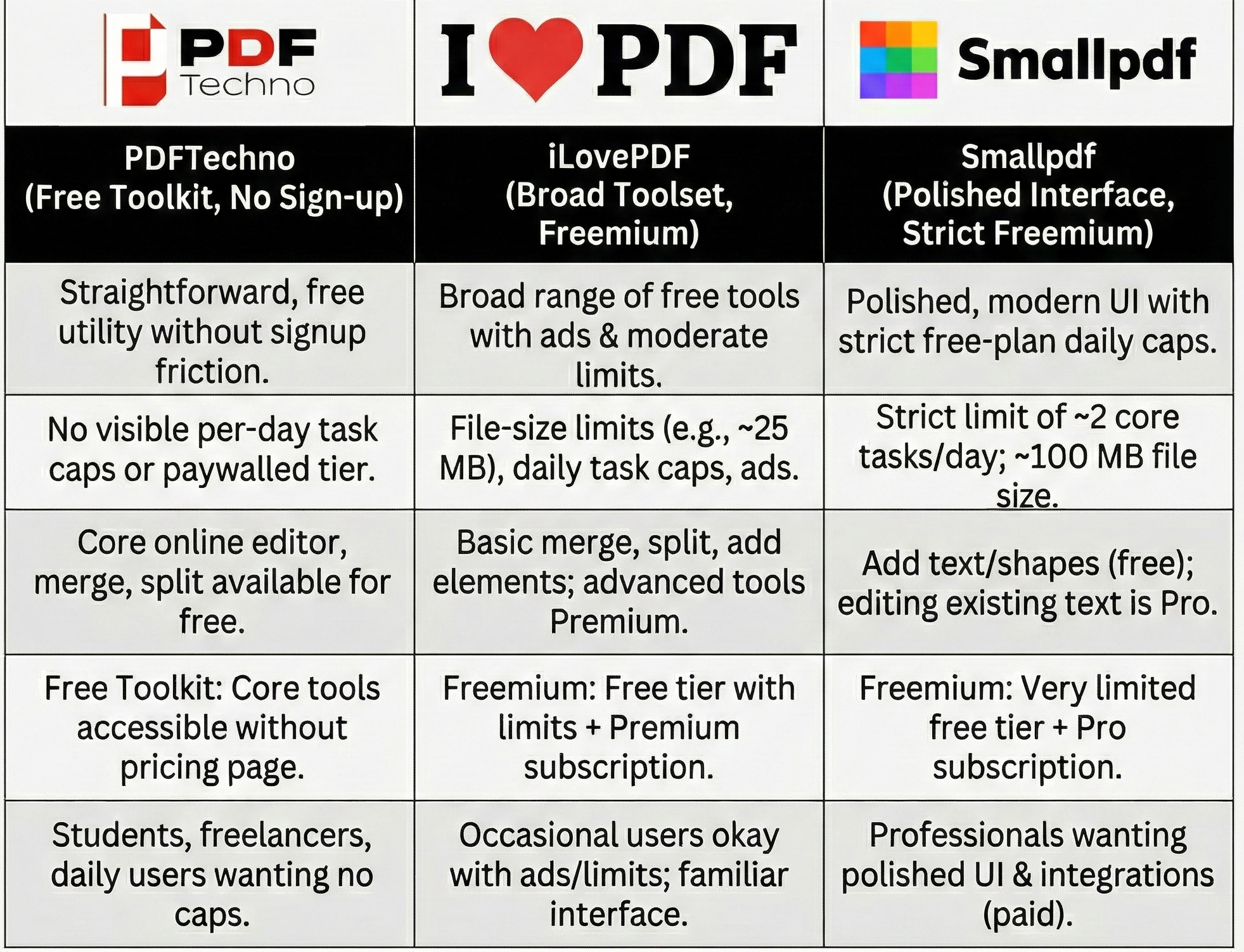
iLovePDF vs Smallpdf vs PDFTechno: Which One Makes the Most Sense in 2025?
PDF tools have gone from being something we use occasionally to something many of us now rely on every single day. Students use them for assignments, freelancers for proposals and invoices, professionals for contracts, and businesses for internal documentation. When a tool becomes this central to your daily work, even small friction—like strict task limits, slow processing, or aggressive paywalls—starts to feel like a real barrier.
Most people know iLovePDF and Smallpdf because they've been around for years and show up often in search results. But popularity doesn't automatically mean they're the most practical or cost-effective—especially if you use PDF tools frequently.
PDFTechno, a newer platform, is positioning itself differently: it focuses on offering a set of free PDF tools with no signup requirement and a straightforward interface. As of late 2025, it's attracting users who are tired of hitting limits elsewhere.
This guide takes a fact-checked look at how iLovePDF, Smallpdf, and PDF Techno compare right now—what you actually get for free, where each one is limited, and in what situations PDFTechno may make more sense.
Overview of the Three Platforms
Understanding the core differences between iLovePDF, Smallpdf, and PDF Techno helps you choose the right tool for your workflow. Here's what each platform offers:
iLovePDF
iLovePDF is one of the most recognizable names in the online PDF space. On its homepage, it advertises that every tool you need to work with PDFs—merge, split, compress, convert, rotate, unlock, watermark—is "100% free and easy to use." In practice, the story is a bit more nuanced.
Independent reviews and user feedback in 2025 note that the free tier comes with some clear trade-offs:
- Ads are shown while you work.
- There are file-size limits for free users (commonly reported around 25 MB per file for the free web version).
- There is a limited number of tasks per day for free users.
- More advanced options and higher performance are reserved for paid (Premium) plans.
So, iLovePDF is perfectly usable if you only need a few quick tasks each day. But if you're regularly processing many files or larger documents, you will eventually run into limits unless you pay.
Smallpdf
Smallpdf is known for its very clean, modern interface and well-organized tools. It positions itself as a polished, professional-grade PDF toolkit, and it has both web and app offerings.
Where things become important for regular users is the free-plan restriction. According to Smallpdf's own help documentation and multiple software review sites in 2025, free users can:
- Access a basic set of tools (such as converting, compressing, e-signing, and basic editing).
- Process up to 2 conversions or core tasks per day on the free plan.
This "two tasks per day" limit is consistently mentioned in official help pages and third-party reviews. For light or occasional use, it's fine. But if you're working with PDFs throughout the day, you'll hit that limit very quickly.
On the editing side, Smallpdf's Edit PDF tool lets free users add text boxes, shapes, images, highlights, and sticky notes. However, actually editing existing text inside a PDF (changing the original text content) is a Pro-only feature. That means many of the deeper editing capabilities still sit behind a subscription.
File-size wise, Smallpdf's own documentation notes that free users can work with files up to around 100 MB; Pro users get effectively unlimited file-size support. Smallpdf also states explicitly in its help content that it does not add watermarks to your PDFs—even on the free plan—unless you deliberately use the watermark tool.
PDFTechno
PDFTechno is a newer platform that offers a suite of online PDF tools. Its public site describes it as a free platform with tools to edit, merge, split, compress, and convert PDF files. The key points it emphasizes are:
- Free PDF tools (no pricing page or paid plan publicly advertised as of late 2025).
- No signup required to start using the core tools.
- A simple, secure, easy-to-use online PDF editor and toolset.
Its About and Privacy pages frame PDF Techno as a security-conscious, user-friendly product built specifically around PDF workflows. It also offers extra tools like signing PDFs, alongside the expected merge, compress, and convert features.
Because PDFTechno does not currently push subscriptions or show a paywall walling off core tools, it feels more like a straightforward utility than a SaaS product. However, since it's newer, it may still be evolving its feature set and business model over time.
Core Tools and What You Actually Get for Free
Comparing the actual features and limitations of each platform helps you understand which one fits your daily workflow. Here's how iLovePDF, Smallpdf, and PDF Techno stack up across essential PDF tasks:
PDF Conversions
All three platforms—iLovePDF, Smallpdf, and PDFTechno—support the key conversion workflows most people need:
- PDF to Word, Excel, PowerPoint, JPG, and back the other way.
- Image to PDF and Office-to-PDF workflows.
The main differences are not in whether the conversions exist, but in how often you can use them and under what conditions:
- On iLovePDF, conversions are available to free users but are subject to file-size limits and daily task caps. Heavier usage is more comfortable on a Premium plan.
- On Smallpdf, conversions are accurate and reliable, but free users are limited to about two core tasks per day. After that, they need to wait or upgrade.
- On PDFTechno, conversions are presented as free tools that you can use without signing up. As of late 2025, there is no published per-day task limit or paywalled conversion tier on the public site, which makes it attractive for users who don't want to manage accounts or subscriptions.
If you regularly handle multiple conversions per day—such as students submitting repeated assignments, HR teams processing documents, or freelancers converting proposals—you will feel the task limits of Smallpdf and the practical limits of iLovePDF's free tier sooner than on a platform that doesn't prominently enforce daily caps.
PDF Compression
Compression quality matters because overly aggressive compression can make text blurry or images unreadable. Here is how compression generally plays out across the three:
- iLovePDF offers compression for free, but higher-quality or more advanced compression presets are tied to its Premium plan. The free version is fine for many everyday uses but can feel limited for very large or image-heavy documents.
- Smallpdf is often praised in reviews for delivering strong compression and reduced file sizes. However, as with many of its more powerful features, some advanced options are part of its Pro offering, and your daily task quota on the free plan still applies.
- PDFTechno includes compression in its suite of free tools. The platform markets its tools as fast and secure, but doesn't currently distinguish separate "basic vs. premium" compression within its public-facing messaging.
For people who frequently upload documents to portals with strict file-size limits—university portals, government forms, corporate HR systems—having reliable compression available without constant paywalls or daily caps can make a real difference.
Editing, Merging, and Page Management
Beyond converting and compressing, many users rely heavily on editing, merging, and page-level tools.
On iLovePDF: basic tools such as merging, splitting, rotating, reordering, and adding simple elements are available on the free tier, but more powerful functions and higher file-size limits are attached to Premium. It is functional, but not fully open-ended for heavy editing under the free plan.
On Smallpdf: the Edit PDF tool lets you add text boxes, shapes, images, highlights, and notes in the free version. To actually modify existing text inside the document, you need a Pro subscription. Merging and splitting are available, but you're still subject to the daily task limits on the free plan.
On PDFTechno: the platform offers an online editor plus tools to merge, split, and reorganize PDFs. These are presented as part of its free toolkit. As of the latest information publicly available, these core tools are usable without creating an account, which makes quick one-off edits or merges particularly convenient.
All three can handle standard merging and splitting scenarios. The key difference is how quickly you run into file-size limits, daily caps, or editing restrictions based on whether you're paying for a subscription.
User Experience: How They Feel to Use
The interface and overall user experience can significantly impact your productivity when working with PDF tools daily. Here's how each platform feels in practice:
iLovePDF
iLovePDF is straightforward and familiar. If you've used it before, you know exactly what to expect: tool tiles on the homepage, drag-and-drop uploads, and a simple flow. Ads on the free version, however, can make the experience feel a bit cluttered, and the performance for larger files or multiple tasks can feel slower unless you upgrade.
Smallpdf
Smallpdf has one of the cleanest interfaces in the space. Its design is minimal, and the tools are logically grouped. From a UI perspective, it feels very polished. The downside is psychological rather than visual: the two-tasks-per-day limit on the free plan and the frequent need for Pro to unlock deeper tools can make it feel like you're always hitting a wall if you try to use it seriously without paying.
PDFTechno
PDFTechno takes a more utility-style approach. The interface is simple and focused on getting the task done rather than showcasing upsells. Because you can start working without logging in and there's no prominent paywall, it feels light and direct—especially for users who prize speed and minimal friction over brand recognition.
Pricing and Limits in 2025
One of the biggest practical differences between these tools is how they handle pricing and limits. Understanding these restrictions helps you choose the platform that won't interrupt your workflow:
iLovePDF Pricing Model
iLovePDF follows a classic freemium model: the web tools are available to everyone, but free users face ads, file-size caps, and a limited number of daily tasks. Premium subscriptions remove these limits, speed up processing, and unlock certain advanced features and desktop/app benefits.
Smallpdf Pricing Model
Smallpdf also uses a freemium model, but with a much stricter free tier. According to its own support documentation and various software comparison sites, the free plan generally allows up to two core tasks per day (such as conversions), plus limited access to some other tools and AI features. Pro plans remove the task caps, boost file-size limits, and unlock advanced features like full text editing, OCR, batch processing, and more robust e-signing.
PDFTechno Pricing Model
PDFTechno, by contrast, currently positions itself as a fully free toolkit: there is no visible pricing or subscription page on its main site as of late 2025, and the tools are accessible without account creation. That makes it feel fundamentally different from typical SaaS products. Of course, as a younger platform, its business model could evolve in the future, but at present it behaves much more like a free utility than a trial-based service.
Privacy and File Handling
Whenever you upload documents—especially sensitive ones like contracts, ID proofs, or financial records—privacy and file handling policies matter just as much as features. Here's how each platform handles your data:
iLovePDF Security
iLovePDF states in its help and security documentation that files are encrypted during transfer and automatically deleted from its servers within about two hours after processing. Users can also manually delete files immediately after download. It emphasizes compliance with modern data protection expectations and does not keep files permanently.
Smallpdf Security
Smallpdf similarly states that files are encrypted (using TLS) and automatically deleted from its servers after a short retention period—typically around one hour for many tools. It does not add watermarks by default to processed PDFs on the free plan and provides detailed help articles explaining its security stance.
PDFTechno Security
PDFTechno publishes a privacy policy that explains how it collects and processes data when users work with its tools. Like most serious PDF platforms, it focuses on securing uploads and handling them according to its stated data-retention rules. While the exact retention window is defined in its policy rather than on the homepage, the framing is that it is designed to be a secure, privacy-aware platform, similar in spirit to the more established tools.
As always, for highly sensitive documents, some users prefer desktop tools or self-hosted solutions. But for everyday online use—assignments, forms, resumes, proposals—all three services align with the standard practice of encrypting transfers and deleting files after a limited time.
Which One Makes the Most Sense in 2025?
All three platforms are capable and widely used, but they suit different types of users based on workflow needs and budget considerations:
Choose iLovePDF If You:
- Want a familiar, broad toolset and don't mind occasional ads or moderate limits on the free plan
- Are comfortable with file-size caps and daily task limits
- Plan to upgrade to Premium for removing usage caps and unlocking better performance
- Need a well-established platform with proven reliability
Choose Smallpdf If You:
- Value a very polished interface and strong integrations
- Are comfortable paying for a subscription to access advanced features
- Use PDF tools occasionally (the free plan works best for light usage due to the two-tasks-per-day model)
- Need features like OCR, batch processing, and advanced e-signing
Choose PDFTechno If You:
- Are a student, job seeker, freelancer, teacher, or small team member
- Need reliable PDF tools without worrying about subscriptions or login friction
- Work with PDFs as part of your daily routine and want to avoid strict free-plan caps
- Prefer a straightforward, no-signup approach to PDF processing
- Often hit task limits on other platforms
If you only work with PDFs occasionally, any of the three will probably do the job. But if you're using PDF tools as part of your daily routine and want to avoid strict free-plan caps, PDFTechno's current "no-signup, fully free toolkit" approach makes it a very compelling option for 2025.
Frequently Asked Questions About PDF Tool Comparison
1. Which is better: iLovePDF or Smallpdf?
Both platforms offer reliable PDF tools, but they differ in pricing models. iLovePDF has moderate free-tier limits with ads, while Smallpdf offers a polished interface but restricts free users to just two tasks per day. Your choice depends on whether you prioritize design (Smallpdf) or slightly more generous free usage (iLovePDF).
2. Is PDFTechno really free?
Yes. PDFTechno currently offers its core tools for free with no visible pricing page or subscription model as of late 2025. You can use tools like merge, split, compress, and convert without creating an account or hitting daily task limits.
3. Do I need to sign up to use PDFTechno?
No. PDFTechno allows you to use all its core PDF tools without registration, making it ideal for quick tasks and users who value privacy.
4. How many PDF tasks can I do per day on Smallpdf's free plan?
Smallpdf's free plan allows approximately two core tasks (like conversions) per day. For unlimited usage, you'll need to upgrade to a Pro subscription.
5. Does iLovePDF show ads?
Yes. iLovePDF displays ads on its free tier. To remove ads and unlock better performance, you need to subscribe to the Premium plan.
6. Which platform is best for students?
PDFTechno is particularly well-suited for students because it offers unlimited free usage without signup requirements, making it easy to handle multiple assignments, conversions, and document edits daily.
7. Are my files safe when using these PDF tools?
All three platforms—iLovePDF, Smallpdf, and PDFTechno—encrypt files during transfer and automatically delete them from their servers after processing (typically within 1-2 hours). However, always review each platform's privacy policy for specifics.
8. Can I edit existing text in PDFs on the free plan?
On iLovePDF and Smallpdf, editing existing text requires a paid subscription. PDFTechno offers an online editor as part of its free toolkit.
9. What are the file-size limits?
iLovePDF's free tier typically caps files at around 25 MB. Smallpdf allows up to 100 MB for free users. PDFTechno supports files up to 100 MB without requiring a subscription.
10. Which platform has the best compression quality?
Smallpdf is often praised for strong compression, but it's limited by daily task caps. PDFTechno offers reliable compression without usage limits, making it practical for frequent use.