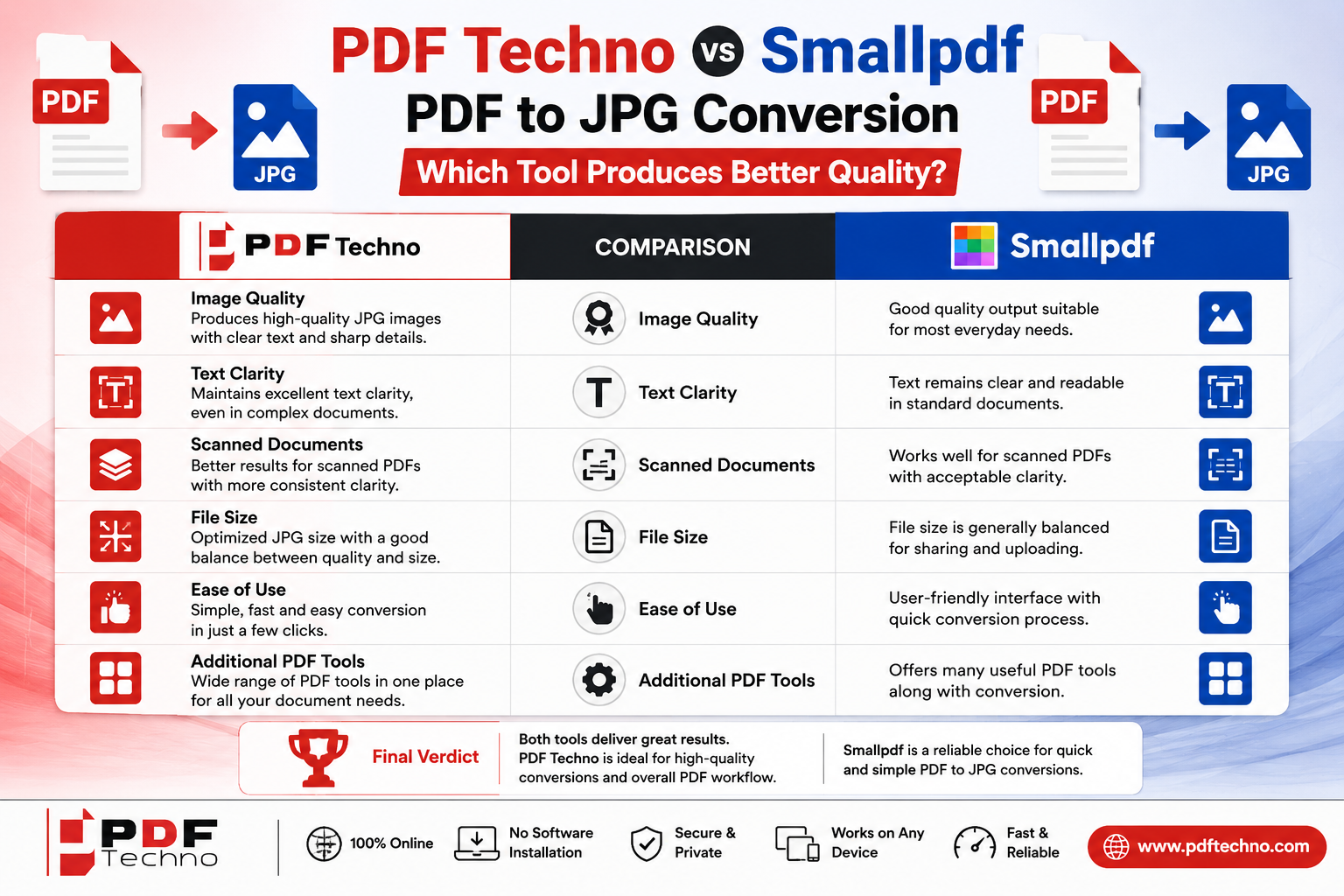
PDF Techno vs Smallpdf PDF to JPG: Which Tool Produces Better Quality?
Converting a PDF into JPG images is a common requirement for students, professionals, businesses, and anyone who needs to share individual PDF pages as images. A PDF may contain a resume, certificate, presentation, report, scanned document, or important form, but sometimes sharing the entire PDF is not convenient. Converting the pages into JPG files makes them easier to upload to image-based platforms, share through messaging apps, add to presentations, or use in other digital projects.
Two online options that can help with this task are PDF Techno and Smallpdf. Both provide PDF-to-JPG conversion tools designed to make the process quick and accessible through a web browser. But when image quality matters, simply converting a PDF is not enough. Users also want to know whether the resulting JPG will remain clear, readable, and visually close to the original PDF.
So, PDF Techno vs Smallpdf PDF to JPG: which tool produces better quality? The answer depends on the original PDF, the content of its pages, the required image quality, and how the resulting JPG will be used. This comparison looks at the most important factors to consider when choosing between the two.
What Is PDF to JPG Conversion?
PDF to JPG conversion changes pages from a PDF document into JPG image files. Depending on the tool and conversion settings, each PDF page can be converted into an individual JPG image.
For example, if a PDF contains ten pages, converting it to JPG may produce ten separate image files. This can be useful when you only need to share individual pages rather than the complete document.
The process is particularly helpful when dealing with platforms that accept image files but do not support PDFs. It can also be useful for creating image previews, adding document pages to presentations, sharing pages on social media, or extracting visual content from a PDF.
However, conversion quality is important. A poor-quality conversion can result in blurry text, pixelated images, distorted graphics, or reduced readability. This is why comparing PDF-to-JPG tools based on output quality is more useful than simply comparing how quickly they convert a file.
PDF Techno PDF to JPG Tool
PDF Techno provides an online PDF-to-JPG conversion tool that allows users to convert PDF pages into JPG images through a browser. The main advantage of an online converter is convenience. Users do not have to install dedicated PDF software just to convert a document.
The process is designed around a simple workflow: upload the PDF, process the document, and obtain the converted JPG files. This can be useful for people who need to convert documents occasionally and do not want to learn complicated software.
PDF Techno can be particularly convenient for everyday documents such as certificates, assignments, reports, scanned documents, and forms. Once converted, the JPG files can be opened and shared like other images.
For users who regularly perform different PDF tasks, having PDF-to-JPG conversion available alongside other PDF utilities can also reduce the need to use multiple websites for different document requirements.
Smallpdf PDF to JPG Tool
Smallpdf is another widely used online PDF platform with a dedicated PDF-to-JPG converter. Its tool allows users to convert PDF documents into JPG images through an online interface.
Smallpdf focuses strongly on making PDF-related tasks accessible to users without requiring specialized software. Its PDF-to-JPG workflow is designed to be straightforward, so even someone who rarely works with PDF tools can generally understand the process.
Like PDF Techno, Smallpdf can be useful for converting reports, scanned documents, presentations, certificates, and other PDF files into image formats.
The platform also offers other PDF utilities, meaning users can continue working with the document after conversion if they need additional PDF-related operations.
PDF Techno vs Smallpdf: Ease of Use
Ease of use is one of the first things to consider when comparing online PDF converters. PDF conversion should ideally take only a few steps.
PDF Techno provides a simple browser-based workflow where users can upload their PDF and convert it into JPG format without installing software. This makes it suitable for users who want to complete a quick conversion without navigating complicated settings.
Smallpdf follows a similarly straightforward approach. Its interface is designed around individual PDF tasks, making it easy to locate the PDF-to-JPG function and start the conversion process.
For beginners, both tools are relatively easy to understand. Neither requires advanced technical knowledge, and the basic conversion process is straightforward.
Winner: Tie. Both platforms provide a user-friendly approach to PDF-to-JPG conversion.
Image Quality: The Most Important Factor
When comparing PDF-to-JPG converters, image quality is arguably more important than the number of features.
A PDF is often designed to preserve the appearance of a document regardless of the device used to open it. JPG, on the other hand, is a raster image format. When a PDF page is converted into JPG, its text, graphics, and other elements have to be rendered into pixels.
This means that the final quality can depend on factors such as the original PDF resolution, fonts, images, page dimensions, and conversion process.
PDF Techno is designed to produce usable JPG versions of PDF pages while maintaining the visual content of the original document. This makes it suitable for everyday conversion where the resulting images need to remain clear and readable.
Smallpdf also focuses on maintaining the appearance of PDF pages during conversion. Text and graphics are rendered into JPG images so that the resulting files can be viewed like regular images.
In practical use, neither platform can guarantee that every PDF will produce exactly the same result because different source PDFs behave differently during conversion.
For example, a PDF containing simple black text on a white background may produce an extremely clear JPG. A document containing detailed charts, photographs, or very small text may require greater attention to image quality.
Winner: Depends on the original PDF and intended use.
Text Clarity
Text clarity becomes particularly important when converting certificates, forms, resumes, academic documents, or reports.
If a PDF contains small text, the converted JPG needs sufficient resolution to keep the characters readable. If the image is rendered at a low resolution, small text may become blurry when the image is enlarged.
PDF Techno can be useful for converting standard documents into JPG images while retaining readable content.
Smallpdf also provides PDF-to-JPG conversion designed to preserve the appearance of the original pages.
Users should remember that increasing the size of a JPG after conversion does not recreate lost detail. If the original conversion produces a low-resolution image, enlarging it later may make the text appear even more pixelated.
For documents with very small text, users should always inspect the converted image before deleting the original PDF.
Images and Graphics
PDFs can contain photographs, illustrations, diagrams, logos, charts, and other graphical elements. These elements can behave differently from text during conversion.
A high-quality conversion should preserve the overall layout and keep graphics recognizable. However, because JPG uses lossy compression, some image detail can potentially be lost.
PDF Techno can be used for converting image-heavy PDF pages into JPG files for general sharing and viewing.
Smallpdf also provides a PDF-to-JPG workflow suitable for documents containing visual elements.
The ideal choice depends on what you intend to do with the resulting JPG. If the image is only being viewed on a phone or shared through a messaging service, moderate quality may be perfectly acceptable. If it will be printed or used in a presentation, higher image quality becomes more important.
File Size vs Image Quality
One of the biggest challenges with JPG conversion is finding the right balance between quality and file size.
Higher-quality images generally contain more visual information and can result in larger files. Smaller JPG files are easier to upload and share, but excessive compression can affect clarity.
PDF Techno and Smallpdf are both designed to make PDF conversion convenient, but the final file size and visual quality can depend heavily on the source document.
A PDF containing mostly text may produce relatively manageable JPG files. A PDF containing full-page photographs may create much larger images.
If the resulting JPG needs to be uploaded to a website with a strict file-size limit, file size becomes an important consideration. If the image is being printed or used professionally, quality should generally take priority.
The best approach is to decide what the image will be used for before choosing the conversion workflow.
Which Is Better for Scanned Documents?
Scanned PDFs are one of the most common reasons people need PDF-to-JPG conversion. A scanned document already consists largely of images, so converting it into JPG essentially turns each scanned page into a separate image file.
This can be useful when submitting individual scanned pages or sharing them through a platform that accepts JPG but not PDF.
PDF Techno can be useful for converting scanned PDF pages into separate JPG images.
Smallpdf can also handle this type of conversion through its PDF-to-JPG tool.
For scanned documents, quality depends heavily on the original scan. If the source PDF is already blurry, dark, tilted, or low resolution, converting it into JPG cannot magically restore missing information.
Therefore, when comparing the two tools, users should evaluate the final JPG based on readability, sharpness, and how closely it resembles the original scan.
Which Tool Is Better for Students?
Students frequently work with PDF files for assignments, certificates, applications, notes, presentations, and project documents.
A student may need to convert a particular page from an assignment into JPG format before uploading it to an image-based form. Similarly, certificates or project pages may need to be shared as images.
PDF Techno can be a convenient option for these everyday tasks because users can access the PDF-to-JPG converter online without installing specialized software.
Smallpdf can serve a similar purpose, particularly for users who already use its other PDF utilities.
For occasional student use, ease of access is likely to matter more than small differences in conversion performance.
Which Tool Is Better for Professional Documents?
Businesses and professionals may convert PDFs into JPGs for presentations, previews, marketing materials, websites, reports, or document sharing.
For professional documents, preserving the original layout is important. A converted image should maintain the position of text, logos, charts, and other visual elements.
Both PDF Techno and Smallpdf can be useful for these tasks. However, users should always review the resulting images before using them publicly, especially if the document contains small text or detailed graphics.
If the image will be printed professionally, users should pay particular attention to resolution and quality rather than choosing a converter solely because it is quick.
PDF Techno vs Smallpdf: Which One Is More Convenient?
Convenience is more than simply having a conversion button. It also includes how easily users can find the tool, upload a document, process it, and continue with other PDF tasks.
PDF Techno provides PDF-to-JPG conversion as part of its broader collection of PDF utilities. This can be convenient for users who frequently move between different PDF operations.
Smallpdf similarly provides PDF-to-JPG conversion alongside other PDF tools, creating an all-in-one environment for users who regularly work with digital documents.
If you already use one platform for other PDF tasks, sticking with the same service can make your workflow more efficient.
Which One Should You Choose?
If you need a straightforward PDF-to-JPG converter and want access to a broad collection of PDF utilities in the same place, PDF Techno is a practical option. It can be useful for students, professionals, and everyday users who need to convert documents without installing additional software.
Smallpdf is also a strong option for users who prefer its interface or already use its other PDF services.
When image quality is your biggest concern, however, it is better not to assume that one converter will always outperform the other. Test the same PDF in both tools and compare the resulting JPGs. Look closely at small text, logos, charts, photographs, edges, and overall sharpness.
Final Verdict
So, PDF Techno vs Smallpdf PDF to JPG: which tool produces better quality?
Both platforms provide convenient online PDF-to-JPG conversion, and both can produce useful results for everyday documents. Smallpdf is known for its simple workflow, while PDF Techno offers PDF-to-JPG conversion as part of a broader collection of online PDF utilities.
There is no universal winner when it comes to image quality because the final result depends heavily on the original PDF. A digitally created document with clear text may look excellent after conversion on either platform, while a low-quality scanned document may remain unclear regardless of which converter is used.
For users who want a convenient PDF-to-JPG solution alongside other PDF utilities, PDF Techno is a strong option to consider. For users already familiar with Smallpdf, its PDF-to-JPG tool provides another straightforward way to convert pages into images.
Ultimately, the best PDF-to-JPG tool is the one that gives you the right combination of clarity, readable text, acceptable file size, and convenience for your specific workflow.
FAQs
Is PDF Techno better than Smallpdf for PDF to JPG conversion?
Both provide PDF-to-JPG conversion. The better result depends on the original PDF, its content, and the intended use of the resulting JPG.
Does PDF to JPG conversion reduce quality?
It can. PDF pages are converted into raster images, and the final quality can depend on resolution and image compression.
Which is better for converting scanned PDFs to JPG?
Both PDF Techno and Smallpdf can be used for scanned PDFs. The original scan quality has a major effect on the final result.
Can I convert every page of a PDF into JPG?
PDF-to-JPG tools generally allow PDF pages to be converted into image files. The exact output workflow can depend on the platform and document.
Is JPG better than PDF for sharing documents?
Not always. JPG can be more convenient when a platform requires an image, while PDF is generally better for preserving a multi-page document's structure and text.
How can I get the best quality when converting PDF to JPG?
Start with a high-quality PDF, avoid unnecessarily compressing the resulting image, and check the clarity of small text and graphics before using the JPG.