Introduction
Choosing the right image format can make a big difference in image quality, file size, and compatibility. Two of the most commonly used formats are PNG and JPEG (JPG). While they may look similar at first glance, each format is designed for different purposes.
Whether you're uploading images to a website, sharing photos on social media, creating logos, or preparing graphics for professional use, understanding the differences between PNG and JPEG will help you make the right choice. In this guide, we'll explain how each format works, their advantages, and when you should use one over the other.
What is JPEG?
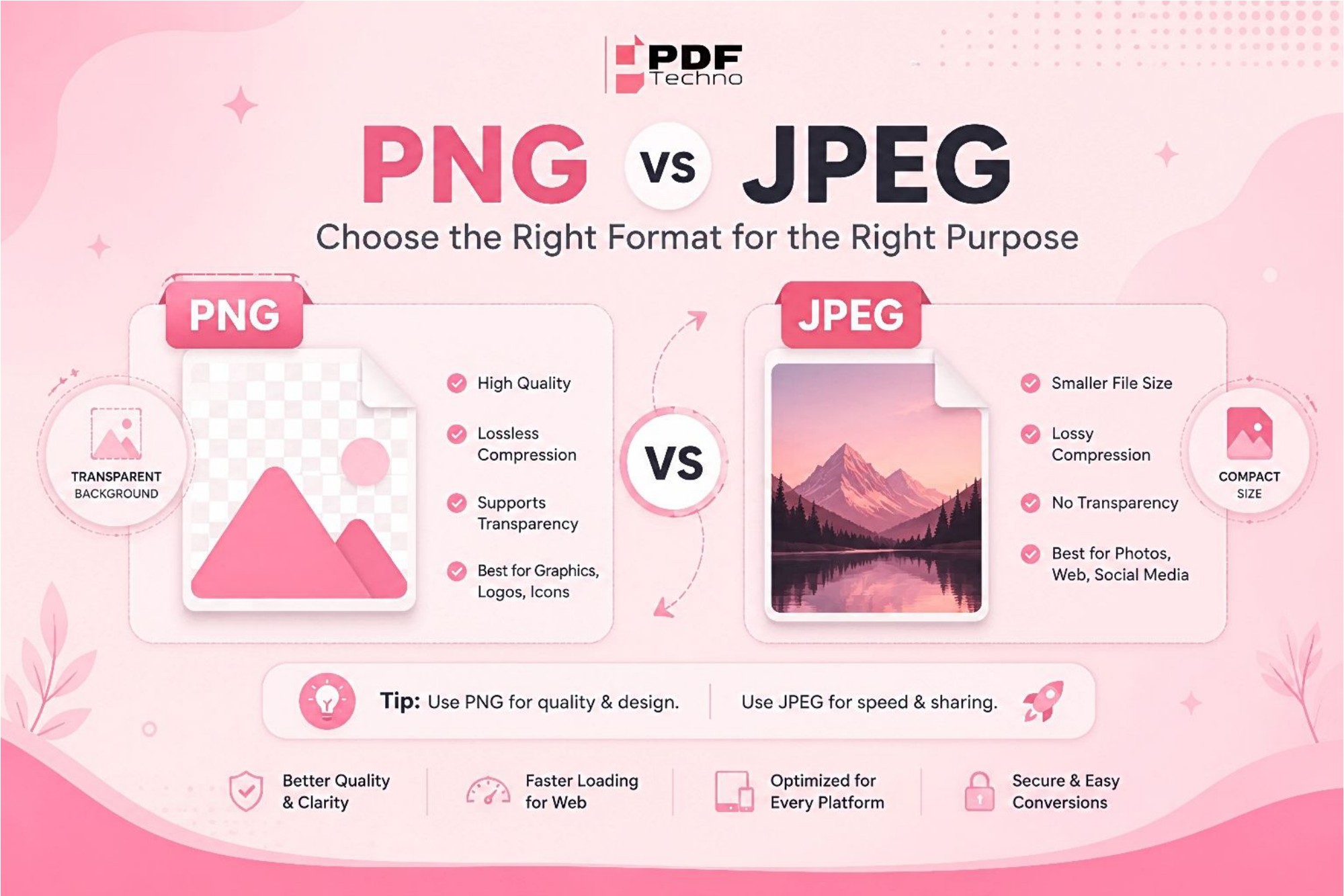
JPEG (Joint Photographic Experts Group) is one of the most popular image formats worldwide. It uses lossy compression, which reduces file size by removing some image data. This makes JPEG files much smaller and easier to share while maintaining good visual quality for most everyday images.
JPEG is commonly used for photographs, social media posts, websites, email attachments, and digital cameras because it offers an excellent balance between image quality and file size.
What is PNG?
PNG (Portable Network Graphics) is a lossless image format that preserves all image details during compression. Unlike JPEG, PNG does not reduce image quality when saving or editing files. It also supports transparent backgrounds, making it the preferred choice for logos, icons, illustrations, and graphic design.
PNG files are generally larger than JPEG files, but they provide sharper images and better quality, especially for graphics containing text or fine details.
When Should You Use JPEG?
JPEG is the best choice for photographs and everyday images where keeping the file size small is important. It is widely used for sharing photos on social media, uploading images to websites, sending pictures via email, and storing large photo collections without taking up too much space. Since JPEG uses efficient compression, it significantly reduces file size while maintaining good visual quality, making it ideal for digital photography, blogs, online stores, and general web use. If you need fast-loading images and maximum compatibility across devices and platforms, JPEG is usually the right format.
When Should You Use PNG?
PNG is the ideal format when image quality and clarity are more important than file size. It is commonly used for logos, icons, illustrations, screenshots, infographics, and images that contain text or detailed graphics because it preserves every detail without losing quality. One of PNG's biggest advantages is its support for transparent backgrounds, making it perfect for graphic design, branding materials, presentations, and website elements. If you want crisp visuals, sharp edges, or need to edit an image multiple times without quality loss, PNG is the better choice.
Which Format Offers Better Quality?
If image quality is your highest priority, PNG is the better choice because it preserves every detail without compression loss. However, if you need smaller files for faster uploads, easier sharing, or limited storage, JPEG provides excellent quality while significantly reducing file size. The best format depends on how you plan to use your image.
Need to Convert Between PNG and JPEG?
There are many situations where converting between PNG and JPEG can make your images more suitable for different purposes. For example, converting PNG to JPEG helps reduce file size without significantly affecting visual quality, making it easier to upload images to websites, send them via email, share them on social media, or save storage space on your device. Smaller JPEG files also load faster, which can improve website performance and provide a better user experience.
On the other hand, converting JPEG to PNG is beneficial when you need higher image quality, sharper details, or support for transparent backgrounds. PNG is often preferred for logos, icons, illustrations, screenshots, and graphics that contain text because it preserves image quality without compression loss. Whether you're creating professional designs, preparing marketing materials, or simply need an image that's compatible with a specific application, choosing the right format can make a significant difference. By converting your images to the format that best suits your needs, you can ensure better compatibility, improved quality, and a smoother experience across different devices, platforms, and software applications.
Tips for Choosing the Right Format
Before saving an image, think about how you'll use it. If you're working with photographs or need smaller files, JPEG is usually the best choice. If you're designing logos, graphics, or images with transparent backgrounds, PNG is the better option. Choosing the correct format can improve image quality, loading speed, and compatibility across different platforms.
Conclusion
Both PNG and JPEG have their own strengths, and neither is better in every situation. JPEG is perfect for everyday photos and web use because of its smaller file size, while PNG excels in preserving image quality and supporting transparency for graphics and design work.
If you ever need to convert between these formats, PDF Techno makes the process quick and hassle-free with its easy-to-use online image conversion tools.
Frequently Asked Questions (FAQs)
1. Which format has better quality, PNG or JPEG? PNG offers better quality because it uses lossless compression.
2. Is JPEG better for photos? Yes, JPEG is ideal for photographs due to its smaller file size.
3. Does PNG support transparent backgrounds? Yes, PNG fully supports transparency, while JPEG does not.
4. Which format is better for websites? JPEG is better for photos on websites, while PNG is best for logos, icons, and graphics.