PNG vs PDF: Key Differences & Which Format Is Better?
Choosing between PNG and PDF might seem simple at first. Both formats are widely used, both are reliable, and both can store high-quality visual content. But when it comes to professional use, file sharing, printing, or submissions, the difference between PNG and PDF becomes important.
The truth is, neither format is universally "better." The right choice depends entirely on your purpose.
If you're designing a logo for a website, PNG may be ideal. If you're submitting documents to a client or institution, PDF is often the smarter choice.
What Is PNG?
PNG stands for Portable Network Graphics. It is a raster image file format designed primarily for digital graphics and web use.
PNG was created as an improved alternative to older image formats, offering better compression and transparency support while maintaining image clarity.
Unlike document formats, PNG is purely an image format. It stores pixel-based data rather than structured pages.
Definition of PNG (Portable Network Graphics)
PNG is a lossless image format. "Lossless" means it preserves image quality without reducing clarity when compressed.
This makes PNG ideal for:
- Screenshots
- Web graphics
- Icons
- Logos
- Design exports
- Social media visuals
Because it maintains detail and sharpness, PNG is commonly used when quality matters.
Key Features of PNG
Understanding PNG's core features helps clarify where it performs best.
Lossless Compression
PNG uses lossless compression, meaning no image data is permanently removed when saving the file.
This ensures:
- Crisp text in screenshots
- Sharp edges in graphics
- Clear fine details
However, this can sometimes lead to larger file sizes compared to other formats.
Raster Image Format
PNG is a raster-based format. This means it stores images as pixels rather than scalable vectors.
As a result:
- PNG files are resolution-dependent
- Enlarging a PNG can cause pixelation
- It is not ideal for scalable print layouts
This is one key difference when comparing PNG vs PDF in professional contexts.
Transparency Support
One of PNG's strongest advantages is transparency.
PNG files support transparent backgrounds, making them perfect for:
- Logos placed over different backgrounds
- Website design elements
- Layered digital artwork
PDF can support transparency in some cases, but PNG handles it more naturally for image-based graphics.
Advantages of PNG
When asking "which is better PNG or PDF," it's important to understand where PNG shines.
PNG is ideal when:
- You need high-quality web graphics
- Transparency is required
- You are exporting digital designs
- You are sharing single images
PNG is simple, clean, and widely supported across devices and browsers.
Limitations of PNG
Despite its strengths, PNG has limitations.
PNG:
- Does not support multi-page documents
- Is not designed for structured formatting
- Can produce large file sizes for high-resolution images
- Is not ideal for professional document submissions
For example, if you have 10 scanned PNG images, you cannot combine them into one structured file without converting them into a document format like PDF.
This is where the difference between PNG and PDF becomes clearer.
What Is PDF?
PDF stands for Portable Document Format. Unlike PNG, which is purely an image format, PDF is a structured document format designed to preserve layout, formatting, and content across devices.
PDF was created to ensure that a file looks exactly the same whether it's opened on a Windows laptop, a MacBook, a mobile phone, or printed on paper.
When comparing PNG vs PDF, this structural difference is critical. PNG stores pixels. PDF stores documents.
Definition of PDF (Portable Document Format)
PDF is a versatile file format capable of containing:
- Text
- Images
- Graphics
- Tables
- Forms
- Multiple pages
It preserves fonts, spacing, margins, and layout exactly as intended.
That's why PDFs are widely used for:
- Contracts
- Reports
- Invoices
- E-books
- Academic submissions
- Government forms
If PNG is an image snapshot, PDF is a complete digital document.
Key Features of PDF
Understanding PDF's core features helps explain why it dominates professional communication.
Multi-Page Support
Unlike PNG, PDF supports multiple pages within a single file.
This means you can:
- Merge scanned pages
- Combine screenshots
- Create structured reports
- Submit complete assignments
When users search "difference between PNG and PDF," this is often the deciding factor.
Structured Layout Preservation
PDF preserves document formatting exactly as designed.
This ensures:
- Proper alignment
- Consistent margins
- Stable font rendering
- Predictable printing results
PNG cannot maintain structured layouts across multiple pages because it is not designed as a document format.
Print-Ready Format
PDF files are optimized for printing.
They maintain:
- Accurate page size
- Clear margins
- High-resolution output
- Consistent scaling
When asking "which is better PNG or PDF for printing?" the answer is almost always PDF.
Advantages of PDF
PDF is preferred when:
- You need professional document presentation
- You want multi-page organization
- You're submitting official files
- You're sharing business documentation
- You want smaller, optimized file size for email
PDF also supports password protection and encryption, making it suitable for sensitive information.
In professional environments, PDF is often the default standard.
Limitations of PDF
While PDF is powerful, it does have limitations.
PDF:
- Is not ideal for graphic editing
- Does not naturally support transparent backgrounds like PNG
- May require specific software for advanced editing
If you are designing a logo or exporting web graphics, PNG is often the better choice.
This shows that PNG vs PDF is not about which is superior, but which suits your purpose.
PNG vs PDF: Key Differences Explained
Now that we understand what each format is, let's directly compare PNG vs PDF across the factors that matter most.
When users search for the difference between PNG and PDF, they're usually trying to decide which format works better for sharing, printing, submitting, or storing files.
Here's how they differ.
File Structure
PNG is an image format. It stores pixel data for a single image.
PDF is a document format. It can contain multiple pages, structured text, images, tables, and formatting.
If you need a standalone image, PNG works well. If you need a complete document, PDF is more suitable.
This is the most fundamental difference between PNG and PDF.
Image Quality
PNG uses lossless compression, which preserves image detail without degrading clarity. This makes it excellent for screenshots, graphics, and logos.
PDF can also preserve high image quality, but it depends on compression settings and how the file is generated.
For single-image clarity, PNG is often ideal. For structured documents containing images, PDF provides better organization.
File Size & Compression
PNG files can become large, especially for high-resolution images.
PDF files can be optimized and compressed, often making them smaller when combining multiple images into one document.
If you're emailing several PNG images, merging them into one optimized PDF can reduce attachment size and improve organization.
Multi-Page Support
PNG does not support multiple pages. Each PNG is a separate image file.
PDF supports multiple pages inside one file.
If you have:
- A scanned contract
- A multi-page report
- Assignment pages
- Several screenshots
PDF is the more efficient format.
This is one of the biggest deciding factors in the PNG vs PDF comparison.
Printing Compatibility
PNG files may not always scale properly when printed. Margins and layout adjustments depend on print settings.
PDF files are print-ready and maintain consistent formatting across printers.
For professional printing, PDF is typically the better choice.
Professional Use
PNG is commonly used for:
- Web graphics
- Digital images
- Design assets
- Social media visuals
PDF is commonly used for:
- Business documents
- Legal paperwork
- Academic submissions
- Official forms
When asking "which is better PNG or PDF for professional use?" PDF usually wins.
Editing Flexibility
PNG files can be easily edited in image editing software.
PDF files can be edited, but often require specialized tools.
If your goal is graphic editing, PNG may be easier to modify. If your goal is document stability, PDF is stronger.
Security Features
PNG does not support password protection or encryption.
PDF supports:
- Password protection
- Restricted permissions
- Digital signatures
For confidential files, PDF provides better security options.
PNG vs PDF Comparison Table
| Feature | PNG | PDF | |---|---|---| | Format Type | Image | Document | | Multi-Page Support | No | Yes | | Transparency | Yes | Limited | | File Size | Can be large | Can be optimized | | Print Ready | Not ideal | Yes | | Professional Use | Limited | Strong | | Security Options | No | Yes | | Best For | Web graphics | Structured documents |
When Should You Use PNG?
PNG is best suited for situations where image clarity and transparency matter more than document structure.
If your content is visual rather than document-based, PNG is often the right choice.
For Web Graphics and Digital Design
PNG is widely used for:
- Website graphics
- UI elements
- App visuals
- Social media creatives
- Blog feature images
Because PNG preserves sharp edges and fine details, it works well for digital screens.
If you're exporting a banner or graphic for online use, PNG is often better than PDF.
When Transparency Is Required
One of PNG's biggest advantages over PDF is transparent background support.
If you need:
- A logo placed over different backgrounds
- Icons without white boxes
- Layered digital designs
PNG handles transparency naturally.
PDF can include transparent elements, but PNG is more commonly used in design workflows.
For Single Image Sharing
If you only need to share:
- A screenshot
- A single chart
- A product image
- A design draft
PNG is simple and convenient.
There's no need to convert to PDF if you are sending just one image and formatting is not critical.
For Image Editing and Creative Work
PNG files are easy to edit in graphic design tools.
If you're:
- Modifying artwork
- Adjusting colors
- Adding visual elements
- Working in Photoshop or similar software
PNG provides flexibility for editing.
When Should You Use PDF?
While PNG is strong for visuals, PDF becomes the better option when structure and professionalism matter.
If you are dealing with documents instead of standalone images, PDF is usually the right choice.
For Document Submission
Many institutions and platforms require PDF uploads.
If you're submitting:
- Academic assignments
- Job applications
- Government forms
- Business proposals
PDF ensures formatting stays intact.
In this case, PDF is better than PNG because it maintains structure.
For Merging Multiple Images
If you have multiple PNG images and need to combine them into one organized file, PDF is more efficient.
Instead of sending 10 separate PNG files, you can merge them into one structured document.
This improves:
- Readability
- Organization
- Professional appearance
This is one of the most common reasons people convert PNG to PDF.
For Business & Legal Communication
Contracts, reports, invoices, and official records are usually shared as PDFs.
PDF offers:
- Multi-page formatting
- Consistent layout
- Better compatibility across devices
When comparing PNG vs PDF for professional communication, PDF is generally preferred.
For Printing and Archiving
PDF is optimized for printing.
It preserves:
- Page size
- Margins
- Font formatting
- Image alignment
If you plan to print a file or archive it for long-term storage, PDF is more reliable.
Which Is Better for Email and Uploads?
If you are sending:
- One image → PNG is fine
- Multiple pages → PDF is usually better
- Official documents → PDF is preferred
PDF also prevents recipients from receiving multiple scattered attachments.
From a workflow standpoint, PDF improves organization and reduces friction.
Final Verdict: PNG or PDF?
So, which format should you choose? The answer depends entirely on your purpose.
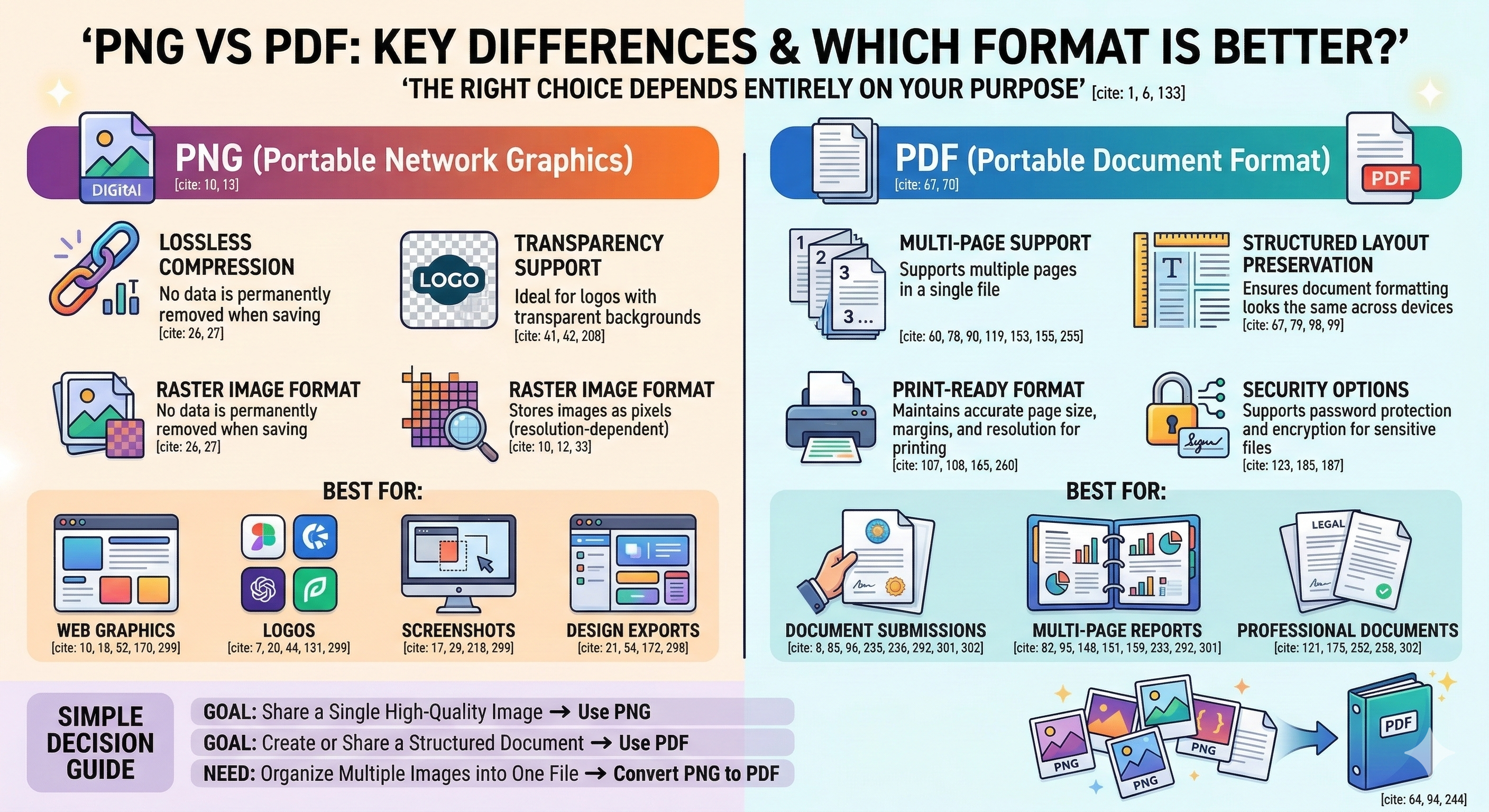
If your goal is to share a single high-quality image, especially one that requires transparency, PNG is the better option. It preserves sharp details, supports transparent backgrounds, and works perfectly for web graphics, logos, and digital visuals.
However, if your goal is to create or share a structured document, PDF is the stronger choice. It supports multiple pages, maintains formatting, ensures print consistency, and provides security options like password protection.
Here's a simple decision guide:
- Use PNG for graphics, screenshots, and web visuals.
- Use PDF for documents, reports, submissions, and professional communication.
- Convert PNG to PDF when you need to organize multiple images into one structured file.
In real-world workflows, many users actually use both formats. You might design something as a PNG but later need to convert it into a PDF for submission or printing.
That's why understanding the difference between PNG and PDF helps you choose smarter and work more efficiently.
If you ever find yourself with multiple PNG images that need to become a clean, professional document, converting them into PDF format is usually the best move.
Frequently Asked Questions
1. What is the main difference between PNG and PDF?
The main difference between PNG and PDF is that PNG is an image format, while PDF is a document format. PNG stores a single image using pixel data, whereas PDF can contain multiple pages, text, images, and structured formatting in one file.
2. Which is better, PNG or PDF?
Neither format is universally better. PNG is better for web graphics and transparent images, while PDF is better for multi-page documents, printing, and professional submissions. The right choice depends on your use case.
3. Is PDF higher quality than PNG?
PNG uses lossless compression, which preserves image quality. PDF can also maintain high quality, but it depends on compression settings. For single images, PNG often preserves clarity better. For structured documents, PDF is more efficient.
4. When should I use PNG instead of PDF?
Use PNG when you need high-quality digital graphics, transparent backgrounds, or editable image files. PNG is ideal for logos, screenshots, website elements, and social media visuals.
5. When should I use PDF instead of PNG?
Use PDF when you need multi-page documents, print-ready formatting, or professional file sharing. PDFs are widely accepted for business communication, academic submissions, and legal documents.
6. Which format is smaller, PNG or PDF?
File size depends on the content. A single PNG can be smaller than a PDF. However, when combining multiple images, converting PNG to PDF often results in better overall compression and easier sharing.
7. Can I convert PNG to PDF without losing quality?
Yes. You can convert PNG to PDF without noticeable quality loss if you choose a tool that supports high-quality or lossless compression settings.
8. Is PNG good for printing?
PNG can be printed, but it is not optimized for structured page layouts. PDF is generally better for printing because it preserves margins, scaling, and formatting more reliably.
9. Does PDF support transparency like PNG?
PDF can support transparency in certain cases, but PNG handles transparent backgrounds more naturally for web and graphic design use.
10. Why do professionals prefer PDF over PNG?
Professionals prefer PDF because it supports multi-page documents, consistent formatting, encryption, and better compatibility across devices and printers. It presents content in a structured and reliable format.