Exact Target: 100KB
Just upload your file — we automatically compress it toward a 100KB target instead of a vague quality slider
- Automatic target sizing
- No settings to configure
- Works on scanned and text PDFs
Shrink any PDF to under 100KB for strict upload limits — government forms, exam applications, and portals that reject anything larger.
Release to add files
Purpose-built for the strictest upload limits — no manual settings to fumble with
Just upload your file — we automatically compress it toward a 100KB target instead of a vague quality slider
We run a quality-preserving pass first, so text stays sharp and images stay readable wherever possible
If 100KB can't be reached safely, you decide whether to push further with maximum compression
Three simple steps to a form-ready, ultra-small PDF
Select or drag and drop the PDF you need under 100KB. Password-protected files are supported too.
Our compressor automatically runs through several compression levels until it gets as close to 100KB as it safely can.
If the target is met, download immediately. If not, choose to force maximum compression or keep the safe version.
Built for the forms and portals that enforce the strictest size caps
Upload documents to portals that flatly reject anything over 100KB
Meet size caps on identity and verification document fields
Send a PDF anywhere attachment size is tightly restricted
A dedicated tool instead of guessing with quality sliders
Skip trial-and-error with compression levels — we aim directly at 100KB for you.
Safe compression is tried before anything aggressive, so your document stays legible.
Compress as many PDFs as you need, with no software to install and no account required.
Common questions about compressing a PDF to 100KB
Most text-based PDFs compress well below 100KB. Image-heavy or scanned PDFs are harder — if our safe compression pass can't reach 100KB, we'll offer to force maximum compression, which usually gets there at the cost of some image quality.
It's an optional second pass that applies grayscale conversion and more aggressive downsampling than the safe pass ever uses on its own. It only runs if you choose it, and it continues the same job — no re-upload needed.
Our safe pass is designed to protect text and layout first. Only if you opt into force mode does image quality noticeably drop, and only then when it's genuinely needed to hit the target.
Yes. If your PDF has a password, you can enter it before compressing, and the file is processed securely and deleted automatically after a short retention period.
Yes, compressing a PDF to 100KB is free. Higher file size limits and batch processing are available on paid plans.
Need a different target size or more control?

Learn how to remove watermark from PDF online. Discover why PDF watermarks need to be removed and how to remove them using PDF Techno.

Learn how to request a signature online and send PDFs for electronic signing. See how to request electronic signatures with PDF Techno.

Convert PDF to Markdown online with PDF Techno. Learn why PDF to Markdown is useful and how to turn PDF content into editable Markdown files.

Have too many PDF files? Learn how to combine multiple PDFs into one organized document for easier sharing, submission, storage, and management.

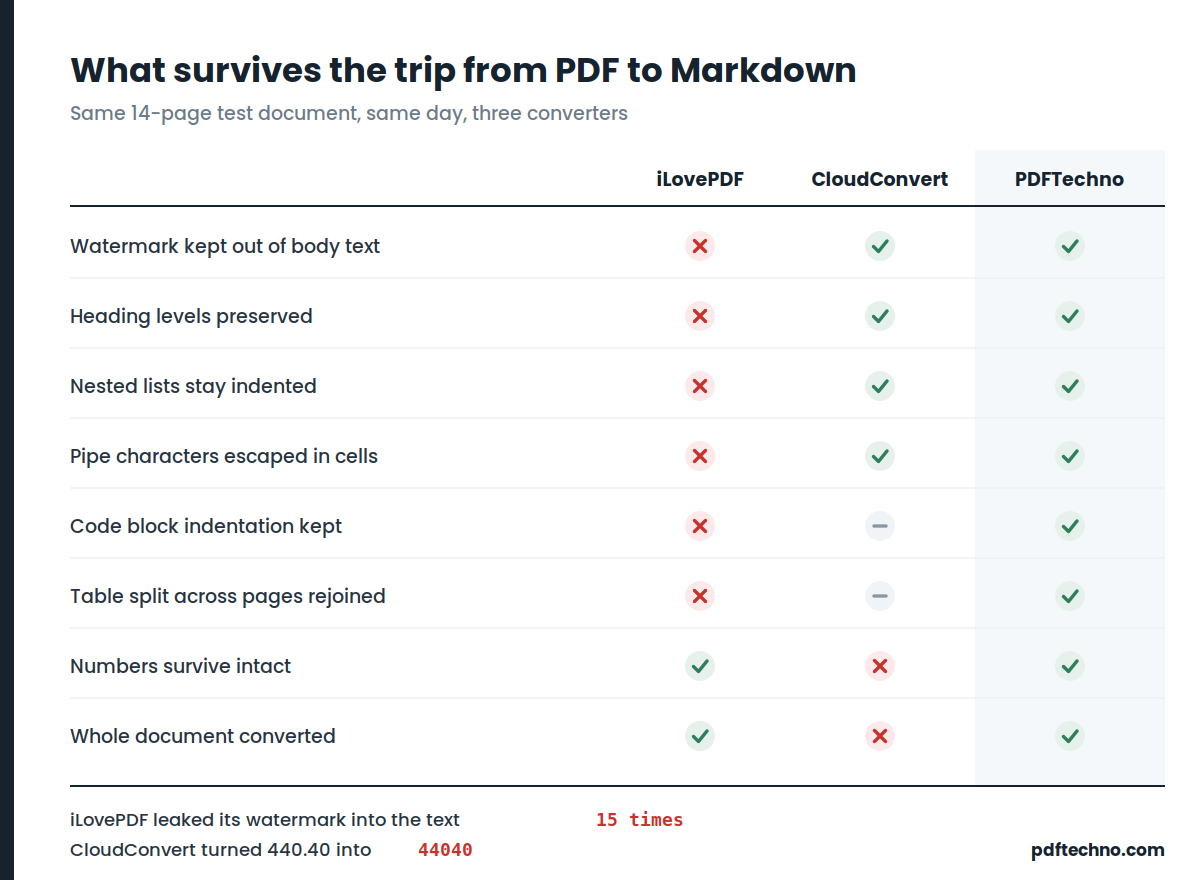
We put three PDF to Markdown converters through 45 structural checks and a real electricity bill. One changed 440.40 into 44040. One leaked its watermark 15 times. Full results and test files.
Learn why XML can be difficult to read and how to convert XML to PDF for easier viewing, sharing, printing, documentation, and record keeping.