
iLovePDF vs CloudConvert vs PDFTechno: PDF to Markdown Tested on a Real Bill
CloudConvert took the number 440.40 off an electricity bill and gave back 44040.
No error. No warning. The decimal point was sitting alone in the row below, and the rest of the output looked completely normal. Had that gone into an accounting pipeline, it would have posted a value a hundred times too large, and nothing anywhere would have flagged it.
That's the problem with PDF to Markdown converters. The output almost always looks fine. You skim it, the headings are there, the paragraphs are there, you move on. The damage surfaces weeks later.
So we stopped skimming and started measuring — 45 structural checks on a purpose-built test file, plus one real, messy government electricity bill that nobody designed for a benchmark.
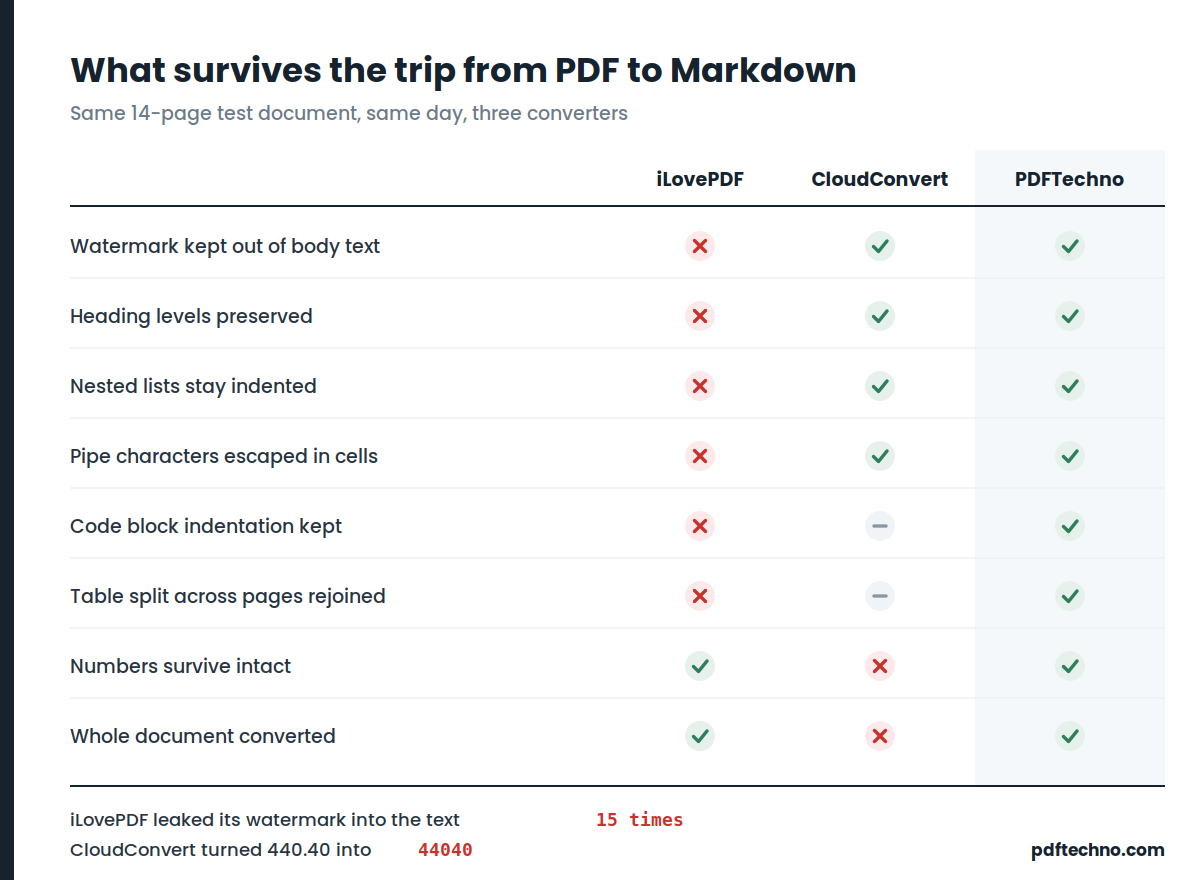
Results at a glance
| iLovePDF | CloudConvert | PDFTechno | |
|---|---|---|---|
| Watermark kept out of body text | ❌ leaked 15× | ✅ | ✅ |
| Heading levels preserved | ❌ all flattened to ## | ✅ | ✅ 4 levels |
| Nested lists indented | ❌ flattened | ✅ | ✅ 3 levels |
| escaped inside cells | ❌ 0 escaped | ✅ | ✅ |
| Code block indentation | ❌ stripped | — | ✅ |
| Numbers survive intact | ✅ | ❌ corrupted | ✅ |
| Table split across pages | ❌ 2 broken tables | — | ✅ rejoined as 1 |
| Borderless tables detected | ✅ | ✅ | ✅ |
| Whole document converted | ✅ | ❌ lost a page | ✅ |
The one-line summary: iLovePDF loses structure. CloudConvert loses accuracy. Structure you can see and repair by hand. Accuracy you cannot.
CloudConvert: beautiful tables, wrong numbers
CloudConvert produces the most sophisticated table markup of the three. Merged cells, escaped pipes, bold and underline preserved. On first read it looks like the clear winner.
Then you check the values against the source.
- 440.40 →
44040, decimal point orphaned in the next row - 5205.00 → split across two cells as
5205.0and0 - 0.00 →
000 #Security Review Charges / NE Charges→ shredded intoSi Ri Ch / NE Chand#ecurty evew arges arges, characters interleaved from two different columns- Column headers destroyed:
Mt R,di Dt,ero;Descriptionsplit intoDescrition+p
And the bill's entire second page was gone — replaced by an OCR'd image blob of gibberish where the tariff tables, grievance forum table and subsidy rules used to be.
For a blog draft, none of this matters much. For an invoice, a bank statement or a utility bill, it's disqualifying.
iLovePDF: nothing corrupted, but the structure is gone
The opposite failure. Every value survived. What didn't survive is everything that makes Markdown Markdown.
The watermark bleeds into your sentences. On a document with a diagonal DRAFT stamp, the word appeared fifteen times in the output, spliced into paragraphs, list items and table cells:
...depends on a well documented recon- DRAFT
b. Check that subtotal plus tax equals the grand total. DRAFT
| Currency DRAFT 45 — Pattern INV | 2026 | 0042 |
The final page of output was, in full:
## DRAFT
The tool clearly has watermark handling — it stripped the running header and page-number footer correctly. It just keys on position in the page margin, and a watermark is painted straight across the body copy. If you handle anything stamped DRAFT, CONFIDENTIAL or COPY, this affects every file you convert.
Every heading becomes ##. Four distinct heading levels in the source, one level out. Document hierarchy, gone.
Nested lists flatten. Business Documents → Finance → Accounts payable ledger came out with all items at the same level, so a child now reads as a sibling. The meaning inverts.
Zero pipes escaped. A cell containing INV | 2026 | 0042 shattered its table into unreadable output. Invoice numbers, file paths and currency lists contain pipes routinely.
Code indentation stripped. The fence is emitted correctly, then every line is flattened to column zero — leaving syntactically dead Python.
PDFTechno: built around the things that break
We built our converter after reading those two output files, so the design targets exactly these failures.
Watermarks are removed by rotation and colour, not position. A watermark is rotated text painted over the body, so we detect it by character angle rather than by where it sits. Zero leaks on the same document that produced fifteen.
Headings come from a measured font-size scale. The scale is built only from lines that actually look like headings, so captions and larger body text don't push real headings down the hierarchy. Four levels in, four levels out.
List depth comes from marker position. Bullet x-coordinates are clustered across the whole document, so nesting survives at three levels with different glyphs at each.
Tables are found by ruling connectivity. Rulings that intersect belong to the same table; three tables stacked 20pt apart stay three tables instead of merging into one grid that swallows the prose between them. Borderless tables are detected separately, by column alignment. Tables split across a page break are rejoined into one, with the repeated header row dropped.
Values are protected specifically. Pipes are escaped. Numbers that wrap inside a narrow cell (24794.8 / 2) are rejoined as 24794.82, not 24794.8 2 — a single stray space there is a meter reading off by a factor of ten.
Pages with no text layer are reported, not silently blanked. If a page is a scan, you're told which page, rather than handed an empty section.
On the electricity bill, all nine spot-checked values came through correct and correctly associated, with both pages present.
pdf.ai, briefly
We also ran pdf.ai. It corrupted nothing — but it flattened tables completely, so values run together:
## 1552.950457.25
803.193.55OK
That first line is three fields: 155, 2.950, 457.25. There's no way to recover the boundaries. Its prose loses spaces too: •ThisBillbeconsideredasa noticeundersection56. Every value present, none of them usable.
Looking for an iLovePDF alternative for Markdown?
iLovePDF is a genuinely good PDF suite — it just isn't built around Markdown structure. If that's what you need, check any alternative on these four before switching:
- Watermark removal that works on the body, not just the margins. Convert a stamped document and search the output for the stamp word. Zero hits, or move on.
- Real heading levels. If a title, its sections and its sub-sections all come out as
##, the tool isn't reading font size properly. - Nested list indentation. Sub-items must stay indented under their parents.
- Pipe escaping. One
|in one cell should not destroy a table.
PDFTechno's PDF to Markdown handles all four, free and with no signup. If you use iLovePDF for other jobs, compress, merge and sign work here too — it's a swap, not a migration.
Looking for a CloudConvert alternative for financial documents?
CloudConvert's numeric corruption is the reason to look elsewhere when your documents contain money. What to demand instead:
- Values that survive a programmatic diff, not an eyeball check — extract every number from source and output and compare them as sets
- No silent page loss — if a page can't be read, the tool should say so rather than substituting bad OCR
- Wrapped numbers rejoined correctly —
24794.8/2must return as24794.82
How we tested
Two documents, because one is never enough.
A 14-page torture file built to break converters, with 45 checks: four heading levels, a heading wrapping across two lines, three-level nested lists, a ruled table, merged cells, a borderless table, a shaded callout that is not a table, a 42-row table split across a page break, a sentence split across a page break, two-column layout, a code block with meaningful indentation, Traditional Chinese, Japanese, Devanagari, Arabic, hyphenated line breaks, annotation-only hyperlinks, running headers, footers and a diagonal watermark.
A real Indian electricity bill — two pages of dense boxed government-form tables that nobody designed for a benchmark.
One caveat we'd rather state than have pointed out: we wrote that torture file, and we fixed our own converter against it while building it. So treat the per-check results above as reproducible facts you can verify on your own documents, not as a scoreboard. The electricity bill is the fairer test, because none of the three tools had ever seen it.
The bug we found in our own converter
While diffing all the outputs on that bill, ours was the only one missing 6545.00 — along with the whole "Your Electricity Bill / Due Date / Surcharge" banner.
The cause: our watermark filter drops very light-coloured text. That banner is white text reversed out of a dark blue panel. White text is precisely what the filter was built to remove. On an electricity bill, that silently deleted the headline amount and the due date — the two fields that matter most.
It's fixed: the converter now checks for a dark filled shape behind light text before dropping it.
We're including this because of what it proves. A synthetic test only finds the bugs its author already imagined. Our torture file had a grey watermark and no reversed-out header, so that check could not possibly fire. One real document found a worse bug than forty-five hand-designed ones.
Which is the real argument of this article: run your own files.
The ten-minute test, on any converter
- Convert something watermarked. Search the output for the watermark word.
- Convert something with a nested list. Are sub-items still indented?
- Convert a table with a
|in a cell. Does the table survive? - Convert a two-column PDF. If the first paragraphs interleave, the tool reads by scanline and every paper you convert will be nonsense.
- Convert a financial document and diff the numbers programmatically. Not by eye — eyes miss silent corruption. Ours did.
- Convert a scanned page. A good tool names the pages with no text layer. A bad one hands you a blank section and says nothing.
Point six matters most. Silence is the worst behaviour a converter can have. Far better to be told "page 7 looked ambiguous" than handed plausible, confident, wrong output.
Try it on your own file
- PDF to Markdown — free, no signup, runs in the browser
- Compress PDF — for files too large to email
- Merge PDF — combine documents before converting
- Sign PDF — add an electronic signature
- All 40+ PDF tools
Found a document it handles badly? Send it to us. Every real file so far has found something our test file didn't.
FAQ
Which is better for PDF to Markdown, iLovePDF or CloudConvert? CloudConvert produces better table structure; iLovePDF preserves values more reliably. For anything financial, CloudConvert's numeric corruption rules it out. For general documents you'll edit anyway, either is workable — you'll just be repairing headings and lists by hand with iLovePDF.
Is there a free iLovePDF alternative that handles Markdown properly? Yes. The gap is structural — flattened headings, flattened lists, unescaped pipes, watermark bleed — so test any alternative on those four specifically before committing.
Does PDF to Markdown keep tables? Ruled tables with visible borders are handled reasonably by most tools. Borderless tables — columns aligned by whitespace alone — are missed by nearly everything. Merged cells and tables split across a page break are where converters differ most.
Why does my converted Markdown have random words mid-sentence? Almost certainly a watermark. The converter is stripping headers and footers by position but painting the watermark straight into the body text. Search for DRAFT or CONFIDENTIAL.
Can I convert a scanned PDF to Markdown? Not directly — a scanned page is an image with no text layer, so there's nothing to extract. You need OCR first. A good converter names the pages with no text instead of returning an empty section.
What's the difference between PDF to Markdown and PDF to text? PDF to text gives you words. PDF to Markdown gives you words plus structure — headings, lists, tables, code blocks, links. Feeding a document to an LLM, that structure is the difference between a useful answer and a confused one.